HP Omen 17 (2023, 17-ck2000) review – it is pretty good but can’t match its direct competitors
Disassembly, Upgrade options, and Maintenance
This laptop’s bottom panel is held in place by 8 Phillips-head screws. After you undo them, use a plastic tool to lift the backside of the panel from the chassis.
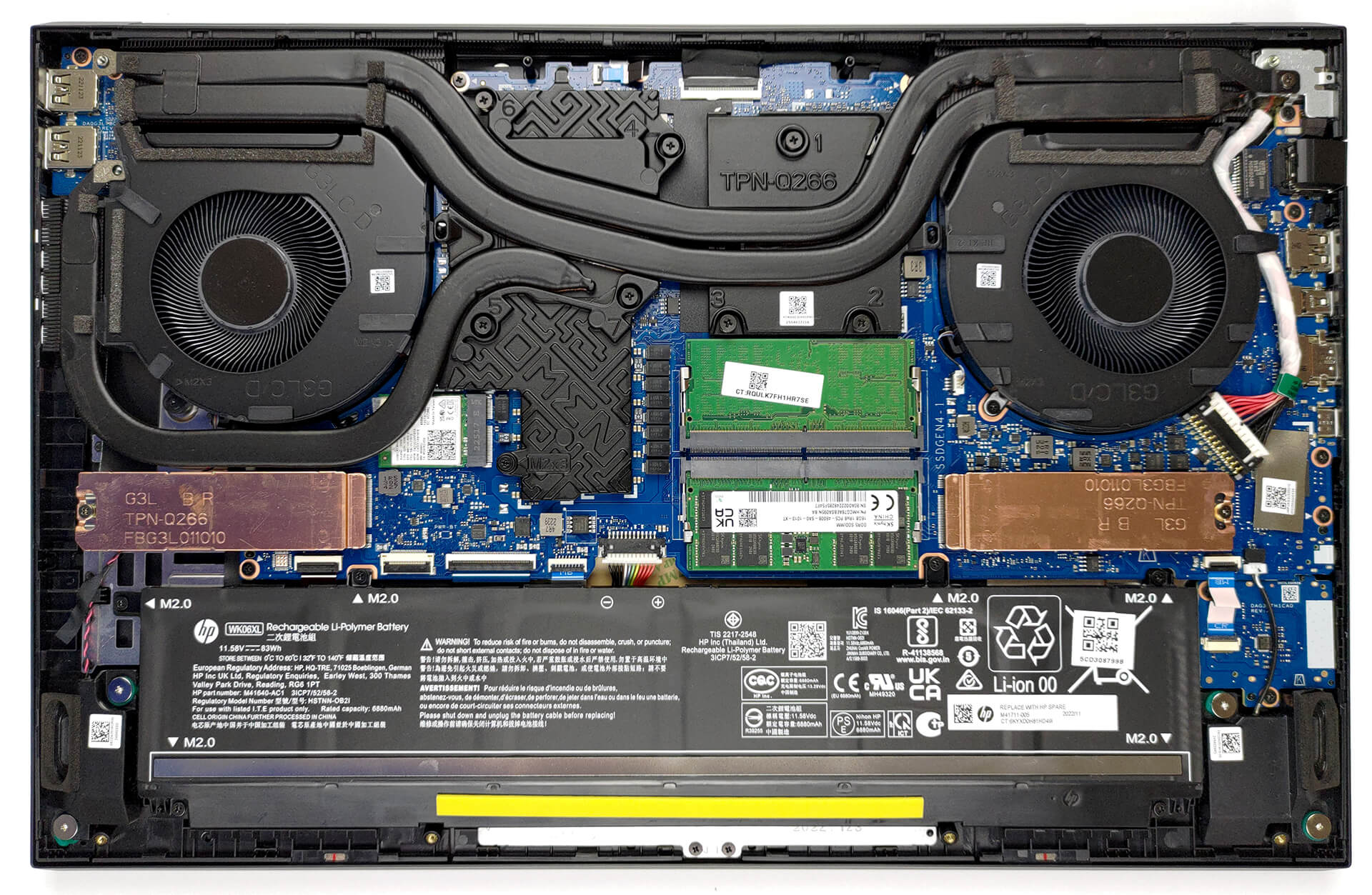
Inside, we see an 83Wh battery pack. To remove it, unplug the connector from the motherboard, and undo the 6 Phillips-head screws that hold the battery to the device.
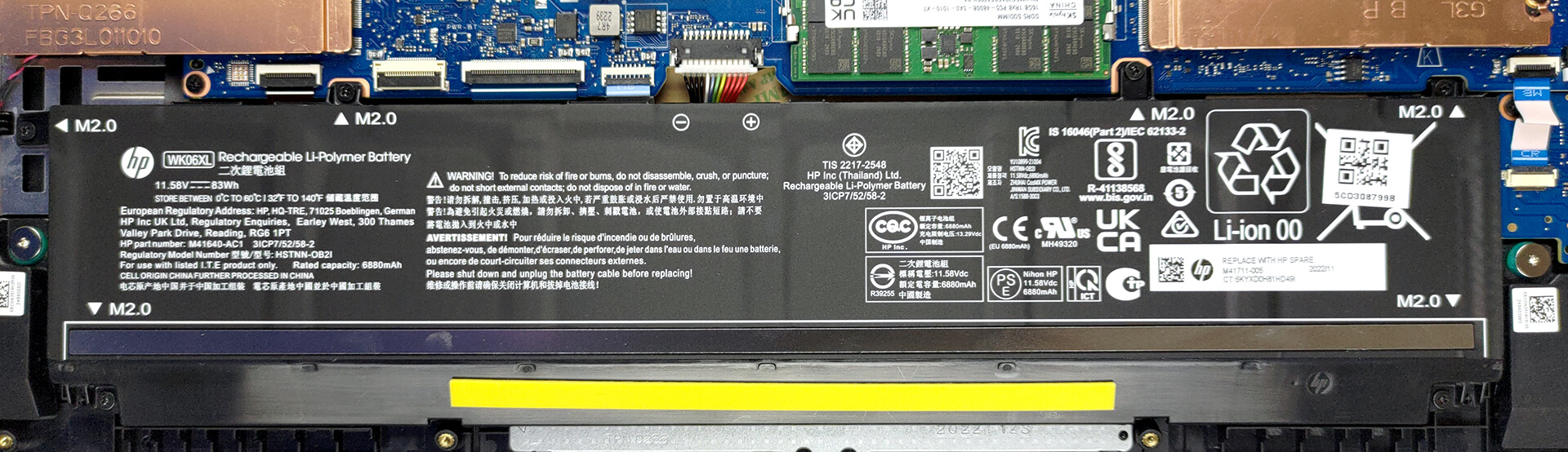
Memory-wise, there are two SODIMM slots that work with DDR5 RAM. It supports modules that work at 5600MHz. As far as the storage goes, you get two M.2 PCIe x4 slots, which support Gen 4 SSDs.

In terms of cooling, you get two heat pipes shared between the CPU and the GPU, with one more dedicated to the graphics card. They lead to three heat sinks, where two fans blow the heat away from the chassis. In addition, the VRMs and the graphics memory are being cooled by a couple of heat spreaders.
 Author: Alex Iliev
 Author: eng. Kroum NikolovHead of Engineering at LaptopMedia.com, inventor and innovator with 40+ years of experience in electronics and high technology.

![[June 2026] Best-Selling Laptop Brands on Amazon Global – Apple’s Unrivaled Dominance in Units and Revenue](https://laptopmedia.com/wp-content/uploads/2026/07/GLOBAL-Best-Brands-400x225.jpg)
![[June 2026] Amazon Global: Top 10 Best-Selling Laptops – Apple’s New MacBook Neo Storms to #1, Reshaping the Market with Affordability](https://laptopmedia.com/wp-content/uploads/2026/07/Best-Selling-Laptops-GLOBAL-Top-10-400x225.jpg)
![[June 2026] Amazon Global: Top 10 Best-Selling Gaming Laptops – Acer’s Nitro V 16S AI Dominates Sales, While ASUS Leads Overall Revenue](https://laptopmedia.com/wp-content/uploads/2026/07/Best-Selling-Gaming-Laptops-GLOBAL-Top-10-400x225.jpg)
![[June 2026] Global Ranking of Best-Selling Laptop GPUs on Amazon – NVIDIA RTX 5060 is the Top-Selling Dedicated GPU](https://laptopmedia.com/wp-content/uploads/2026/07/Best-Selling-GPUs-GLOBAL-Top-10-400x225.jpg)
![[June 2026] Global Ranking of Best-Selling Laptop CPUs on Amazon – Apple M5 Dominates, AMD Ryzen 7 260 Gets Solid Premium Share](https://laptopmedia.com/wp-content/uploads/2026/07/Best-Selling-CPUs-GLOBAL-Top-10-400x225.jpg)

I bought this laptop and I’m disappointed for the price I paid. I instantly upgraded the ram, but my research said gen 13 i7 only supports up to 4800 ram. I9 will do 5200 and maybe higher. But what I’m most disappointed at is the bios has almost no features. I’m not talking about overclocking. At boot, if you hit ESC and wait for the bios text, then his win+A, you can get into advanced bios, which is just the ability to view ram timing. You can under clock the ram. That’s their idea of boosting performance. All I want… Read more »
But how was the general performance itself? The frames, etc. And the heating too, how are thermals
Cant get into advanced bios, any suggestion?
Yeah, the BIOS on most laptops are a joke, but this one takes it to a whole new level. The most barebones I have ever seen. They have this laptop locked down hard.
It has TWO BIOS screens, the very basic testing one & the advanced one, two totally different ways to get into them. The OMEN software is needed to tweek setting for power saving & performance, however, HP Omen softwar is SPYWARE & illegally ‘phones home’ all your private & gaming data, scans your games and the tries to shep their game sales on you. You can block OMEN spying to HP by altering the HOSTS File & blocking HP from your LANs at the router firewall level. OMEN software is the obscene case of digital tresspassing I’ve seen since Windows… Read more »
ok, is there anything factual to say that this laptop is well below the competition ? Overheating and noisy in what condition ?
Boken in under 3 months. Won’t power up. HP Trash, I picked them over Asus & never again.HP, I’m out $2k
Have it a mux-sitch to use G-Sync comp?