MSI Stealth 16 Studio (A13V) review – it has the power and it has the bling
Verdict
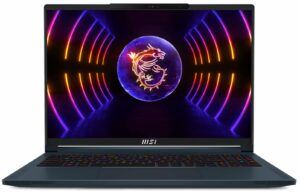
 This is a fantastic product meant for designers, gamers, and people with good taste. Its Magnesium-Aluminum body is thin and light – 20mm and 1.99 kg, while the design doesn’t really tell the true story about its performance capability.
We can’t really say that the build quality is perfect since there are some squeaks coming from the base when we try to twist it. To be fair, these noises are present only in unnatural use, so you shouldn’t be worried.
MSI Stealth 16 Studio (A13V)’s IPS panel has a WQXGA resolution, comfortable viewing angles, high maximum brightness, and a good contrast ratio. This display supports HDR and doesn’t use PWM for brightness adjustment.
In addition, the panel covers 100% of the DCI-P3 color gamut, and thanks to our Gaming and Web design profile, it achieves one of the most accurate colors we’ve seen. Moreover, the MSI True Color app emulates the sRGB color space too, which is great for Web designers.
Not in the last place, this panel has a 240Hz refresh rate, which is paired with really fast pixel response times. As a result, this laptop is extremely smooth. A MUX switch allows you to use the maximum out of the dedicated graphics card.
In addition to that, the MSI Creator Center gives you the option to run the display at 60Hz in order to preserve the battery life. To be honest, this is quite effective, as we got about 9 hours of Web browsing or video playback. Yes, a big chunk of this good result is thanks to the huge 99.9Wh battery, but we’ve seen such batteries struggle with powerful hardware before.
We can’t pass the fact that there are two SODIMM slots for DDR5 RAM and two M.2 PCIe x4 slots for Gen 4 SSDs. With that said, both internal and external ports are great. You also get a MicroSD card slot, a Thunderbolt 4 connector, a 2.5Gbit LAN port, and many more.
At the end of the day, this laptop is worth every cent. Yes, there are some disadvantages, but the overall package is simply fantastic. And with an IR face recognition scanner, fingerprint reader, and display like that, you shouldn’t worry about anything.
You can check the prices and configurations in our Specs System: https://laptopmedia.com/series/msi-stealth-16-studio-a13vx/
Pros
- Fingerprint reader and IR face recognition scanner
- 2x M.2 PCIe x4 Gen 4 slots, 2x DDR5 RAM SODIMM slots in dual channel/li>
- Covers 100% of the DCI-P3 color gamut and has accurate color representation with our Gaming and Web design profile (AUO B160QAN02.3 (AUO26A9))
- Snappy panel with quick response times (AUO B160QAN02.3 (AUO26A9))
- No PWM (AUO B160QAN02.3 (AUO26A9))
- MUX switch
- Wide port selection
- Decent battery life
- The keyboard remains relatively cool after long gaming sessions
- Good build quality
Cons
- Chassis has some noisy flex
- Short key travel

 Author: Alex Iliev
 Author: eng. Kroum NikolovHead of Engineering at LaptopMedia.com, inventor and innovator with 40+ years of experience in electronics and high technology.

![[August 2026] Amazon Italy: Top 10 Best-Selling Laptops – Apple MacBook Neo Claims the Crown as Budget and Mid-Range Windows Machines Dominate Volume](https://laptopmedia.com/wp-content/uploads/2026/09/Best-Selling-Laptops-IT-Top-10-400x225.jpg)
![[August 2026] Amazon Italy: Top 7 Best-Selling Gaming Laptops – ASUS V16 Claims the #1 Spot Amid Strong Mid-Range Demand](https://laptopmedia.com/wp-content/uploads/2026/09/Best-Selling-Gaming-Laptops-IT-Top-10-400x225.jpg)
![[August 2026] Best-Selling Laptop Brands on Amazon Italy – Lenovo Dominates Market Share and Revenue Leadership](https://laptopmedia.com/wp-content/uploads/2026/09/IT-Best-Brands-400x225.jpg)
![[August 2026] Amazon India: Top 10 Best-Selling Laptops – Apple MacBook Neo Dominates the Charts with Massive Sales Lead](https://laptopmedia.com/wp-content/uploads/2026/09/Best-Selling-Laptops-IN-Top-10-400x225.jpg)
![[August 2026] Amazon India: Top 10 Best-Selling Gaming Laptops – HP Victus 15 Dominates the Market with Massive Unit Lead](https://laptopmedia.com/wp-content/uploads/2026/09/Best-Selling-Gaming-Laptops-IN-Top-10-400x225.jpg)

Una pregunta: cómo se puede activar la pantalla a 60hz?
Nvidia panel.
Hi, could you please help me. do set the GPU to hybrid mode or only integrated mode. I simply cant replicate the 9 hours of web browsing