ASUS ExpertBook B1 (B1502) review – business features on the budget
Temperatures and comfort, Battery Life
Max CPU load
In this test we use 100% on the CPU cores, monitoring their frequencies and chip temperature. The first column shows a computer’s reaction to a short load (2-10 seconds), the second column simulates a serious task (between 15 and 30 seconds), and the third column is a good indicator of how good the laptop is for long loads such as video rendering.

Average P-core frequency; Average E-core frequency; CPU temp.; Package Power
| Intel Core i5-1235U (15W TDP) | 0:02 – 0:10 sec | 0:15 – 0:30 sec | 10:00 – 15:00 min |
|---|---|---|---|
| ASUS ExpertBook B1 (B1502) | 2.54 GHz @ 2.28 GHz @ 58°C @ 28W | 2.59 GHz @ 2.29 GHz @ 67°C @ 28W | 1.99 GHz @ 1.98 GHz @ 64°C @ 21W |
| Lenovo ThinkBook 14 Gen 4 | 2.55 GHz @ 2.33 GHz @ 64°C @ 33W | 2.45 GHz @ 2.31 GHz @ 71°C @ 32W | 2.32 GHz @ 2.19 GHz @ 67°C @ 28W |
| Acer Aspire 3 (A315-59) | 3.07 GHz @ 2.76 GHz @ 64°C @ 45W | 2.84 GHz @ 2.61 GHz @ 73°C @ 40W | 2.37 GHz @ 2.29 GHz @ 70°C @ 28W |
| ASUS Vivobook 17 (X1702) | 3.21 GHz @ 2.68 GHz @ 68°C @ 39W | 2.86 GHz @ 2.53 GHz @ 72°C @ 33W | 2.15 GHz @ 2.22 GHz @ 61°C @ 24W |
| Lenovo ThinkPad L15 Gen 3 | 3.25 GHz @ 2.69 GHz @ 88°C @ 44W | 3.05 GHz @ 2.64 GHz @ 95°C @ 41W | 1.98 GHz @ 1.92 GHz @ 70°C @ 20W |
| Fujitsu LifeBook U7512 | 3.00 GHz @ 2.54 GHz @ 88°C @ 40W | 2.40 GHz @ 2.14 GHz @ 85°C @ 28W | 2.31 GHz @ 2.07 GHz @ 83°C @ 26W |
| HP ProBook 450 G9 | 3.44 GHz @ 2.82 GHz @ 80°C @ 47W | 2.45 GHz @ 2.14 GHz @ 74°C @ 26W | 2.33 GHz @ 2.09 GHz @ 73°C @ 24W |
| HP ProBook 440 G9 | 3.25 GHz @ 2.74 GHz @ 79°C @ 46W | 2.49 GHz @ 2.23 GHz @ 87°C @ 30W | 2.20 GHz @ 2.08 GHz @ 73°C @ 24W |
| Lenovo ThinkBook 14s Yoga Gen 2 | 2.55 GHz @ 2.39 GHz @ 70°C @ 32W | 2.49 GHz @ 2.38 GHz @ 75°C @ 32W | 2.20 GHz @ 2.10 GHz @ 71°C @ 24W |
| Microsoft Surface Pro 9 | 3.32 GHz @ 2.78 GHz @ 75°C @ 46W | 3.06 GHz @ 2.54 GHz @ 82°C @ 42W | 1.91 GHz @ 1.79 GHz @ 64°C @ 19W |
| Microsoft Surface Laptop 5 (13.5″) | 3.35 GHz @ 2.84 GHz @ 69°C @ 44W | 3.27 GHz @ 2.78 GHz @ 80°C @ 42W | 2.24 GHz @ 2.17 GHz @ 71°C @ 22W |
| ASUS Vivobook 15 (X1502) | 2.91 GHz @ 2.49 GHz @ 78°C @ 39W | 2.62 GHz @ 2.37 GHz @ 81°C @ 33W | 2.30 GHz @ 2.19 GHz @ 68°C @ 27W |
| Acer TravelMate P2 (TMP215-54) | 3.67 GHz @ 3.09 GHz @ 90°C @ 55W | 2.83 GHz @ 2.55 GHz @ 85°C @ 33W | 2.59 GHz @ 2.44 GHz @ 84°C @ 28W |
| HP EliteBook 650 G9 | 3.26 GHz @ 2.80 GHz @ 89°C @ 45W | 2.63 GHz @ 2.39 GHz @ 91°C @ 32W | 2.25 GHz @ 2.15 GHz @ 79°C @ 24W |
| HP EliteBook 640 G9 | 3.27 GHz @ 2.77 GHz @ 90°C @ 45W | 2.53 GHz @ 2.32 GHz @ 90°C @ 30W | 2.32 GHz @ 2.17 GHz @ 74°C @ 24W |
| HP EliteBook 840 G9 | 3.09 GHz @ 2.75 GHz @ 83°C @ 46W | 2.73 GHz @ 2.46 GHz @ 89°C @ 37W | 1.58 GHz @ 1.67 GHz @ 61°C @ 17W |
| Lenovo ThinkPad E14 Gen 4 | 3.28 GHz @ 2.77 GHz @ 84°C @ 44W | 3.18 GHz @ 2.77 GHz @ 90°C @ 44W | 2.49 GHz @ 2.28 GHz @ 77°C @ 28W |
| HP Pavilion Plus 14 (14-eh0000) | 2.85 GHz @ 2.43 GHz @ 77°C @ 39W | 2.34 GHz @ 2.10 GHz @ 75°C @ 29W | 1.84 GHz @ 1.79 GHz @ 65°C @ 20W |
| Lenovo IdeaPad 5 (15″, 2022) | 3.60 GHz @ 3.08 GHz @ 73°C @ 55W | 3.44 GHz @ 2.95 GHz @ 88°C @ 51W | 2.80 GHz @ 2.49 GHz @ 69°C @ 35W |
| Lenovo ThinkPad L14 Gen 3 | 3.20 GHz @ 2.77 GHz @ 83°C @ 44W | 3.10 GHz @ 2.71 GHz @ 94°C @ 43W | 1.89 GHz @ 1.95 GHz @ 72°C @ 20W |
| Acer Aspire Vero (AV14-51) | 3.63 GHz @ 2.87 GHz @ 84°C @ 55W | 2.73 GHz @ 2.36 GHz @ 81°C @ 33W | 2.49 GHz @ 2.23 GHz @ 79°C @ 28W |
| MSI Modern 14 (C12M) | 3.17 GHz @ 2.69 GHz @ 77°C @ 45W | 3.10 GHz @ 2.61 GHz @ 81°C @ 45W | 2.69 GHz @ 2.45 GHz @ 78°C @ 35W |
| Dell Latitude 15 5530 | 3.57 GHz @ 3.02 GHz @ 94°C @ 52W | 2.03 GHz @ 2.09 GHz @ 76°C @ 21W | 2.24 GHz @ 2.19 GHz @ 64°C @ 23W |
The ExpertBook B1 (B1502) prefers to run its CPU in a cool manner, rather than all-out banging clocks higher than 3.00 GHz. Instead, you can see that the power limit is 28W.
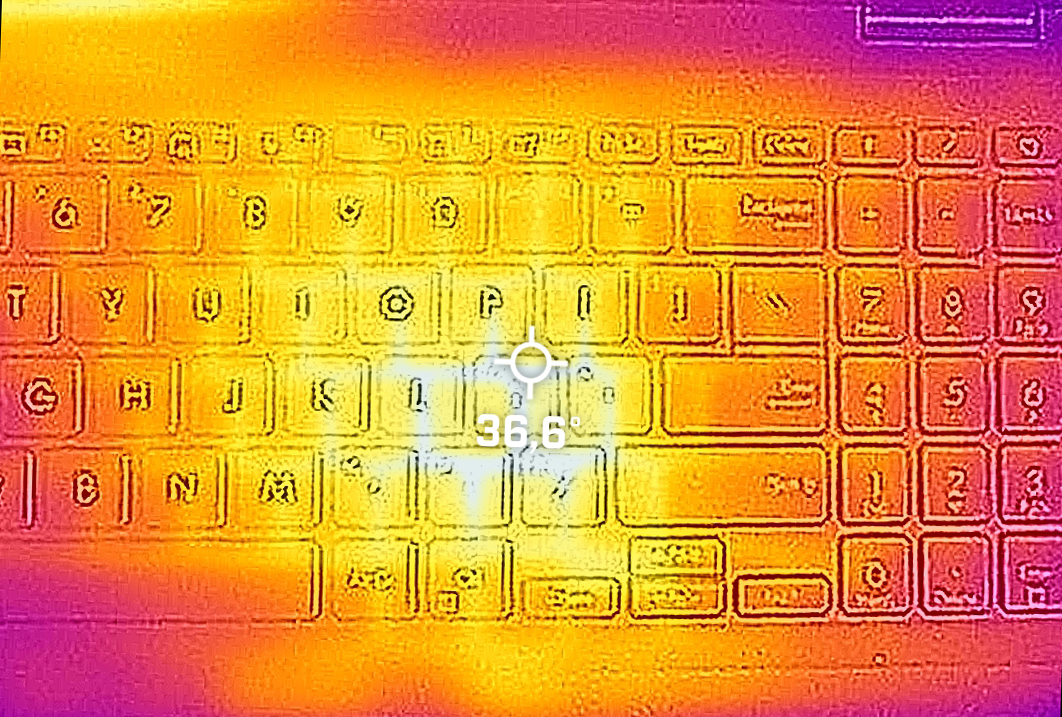
Comfort during full load
This ensures both cool and quiet performance even under extreme conditions.
Battery
Now, we conduct the battery tests with the Windows Better performance setting turned on, screen brightness adjusted to 120 nits and all other programs turned off except for the one we are testing the notebook with. Here, the 42Wh battery pack lasts for 8 hours and 35 minutes of Web browsing, or 6 hours and 23 minutes of video playback.
Brightness: 180 nits; Display Mode: SDR
Time to Full Discharge: Higher is Better

In order to simulate real-life conditions, we used our own script for automatic web browsing through over 70 websites.
 Author: Alex Iliev
 Author: eng. Kroum NikolovHead of Engineering at LaptopMedia.com, inventor and innovator with 40+ years of experience in electronics and high technology.

![[August 2026] Best-Selling Laptop Brands on Amazon USA – Apple Dominates Market Revenue and Volume Despite Lower Model Diversity](https://laptopmedia.com/wp-content/uploads/2026/09/COM-Best-Brands-1-400x225.jpg)
![[August 2026] Amazon USA: Top 10 Best-Selling Laptops – Apple MacBook Neo Dominates the Market with Massive Unit Sales!](https://laptopmedia.com/wp-content/uploads/2026/09/Best-Selling-Laptops-COM-Top-10-400x225.jpg)
![[August 2026] Amazon USA: Top 10 Best-Selling Gaming Laptops – ASUS ROG Strix G16 Dominates the Market with Massive Unit Sales](https://laptopmedia.com/wp-content/uploads/2026/09/Best-Selling-Gaming-Laptops-COM-Top-10-400x225.jpg)
![[July 2026] Amazon Global: Top 10 Best-Selling Laptops – Apple MacBook Neo Dominates the Charts as Budget and Premium Notebooks Split the Market](https://laptopmedia.com/wp-content/uploads/2026/08/Best-Selling-Laptops-GLOBAL-Top-10-400x225.jpg)
![[July 2026] Amazon Global: Top 10 Best-Selling Gaming Laptops – ASUS ROG Strix G16 Dominates the Global Market with Record-Breaking Unit Sales](https://laptopmedia.com/wp-content/uploads/2026/08/Best-Selling-Gaming-Laptops-GLOBAL-Top-10-400x225.jpg)

que voltaje tienen los altavoces? en la pagina oficial no aparecen
Sorry but I find the backlit keyboard pathetically dim. Tried forcing the registry key to a higher level but didn’t work. Called support…they said this laptop only has on or off…but you’ll see that when restarting the notebook the intensity is decent but then fades. Will need to buy another laptop for my client.