ASUS ROG Zephyrus G16 GU605 review – Thin on Size, Big on Power, This OLED Laptop is a Gaming Beast
Display quality, Health impact (PWM), Sound
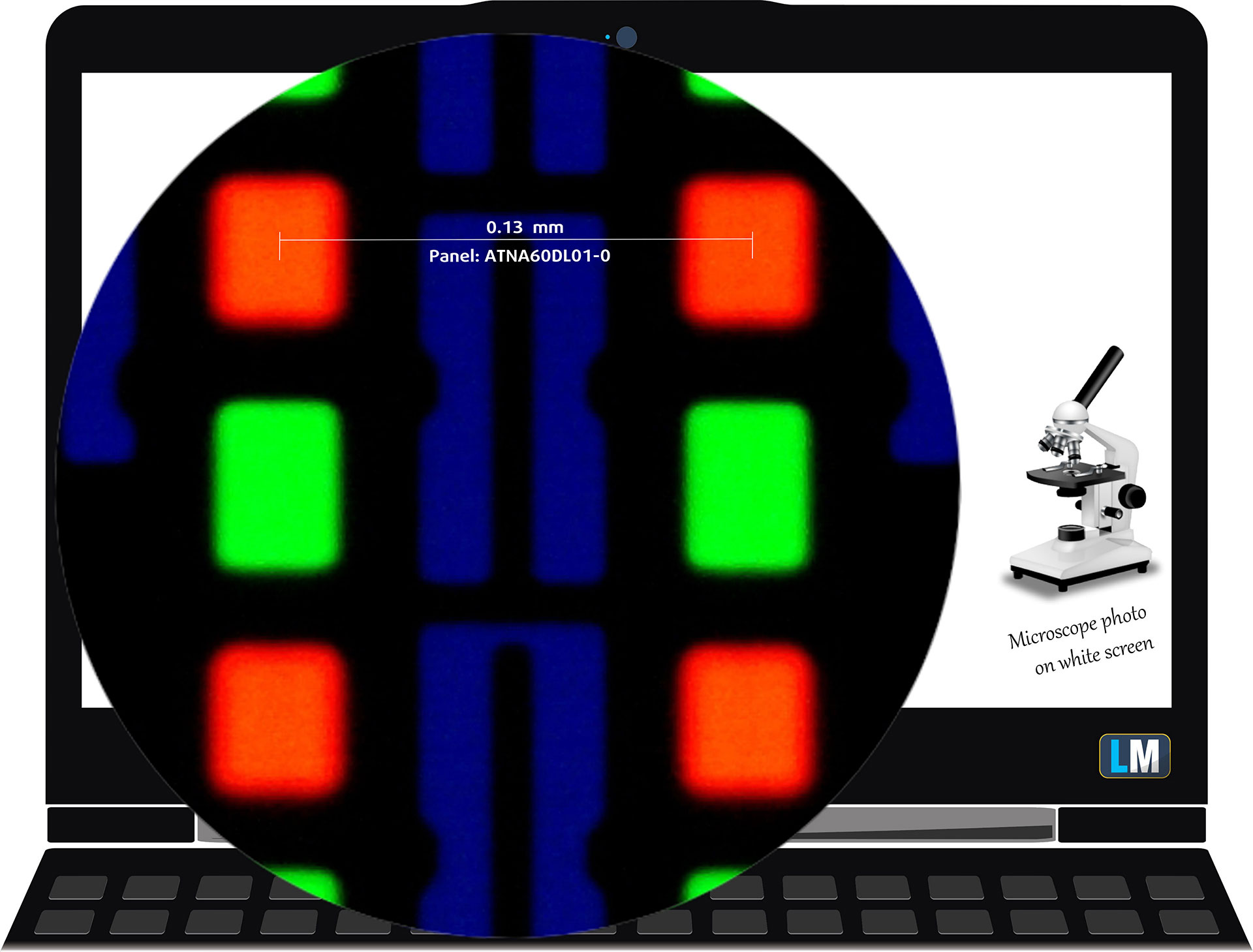
ASUS ROG Zephyrus G16 GU605 is equipped with a WQXGA OLED panel, model number Samsung ATNA60DL01-0 (SDC41A3). It comes with a 240Hz refresh rate and 10-bit color support (10-bit color depth). Its diagonal is 16.0″ (40.6 cm), and the resolution – 2560 х 1600p. Additionally, the screen ratio is 16:10, the pixel density – 189 ppi, and their pitch – 0.13 x 0.13 mm. The screen can be considered Retina when viewed from at least 46 cm which is excellent for a laptop (from this distance, the average human eye can’t see the individual pixels).
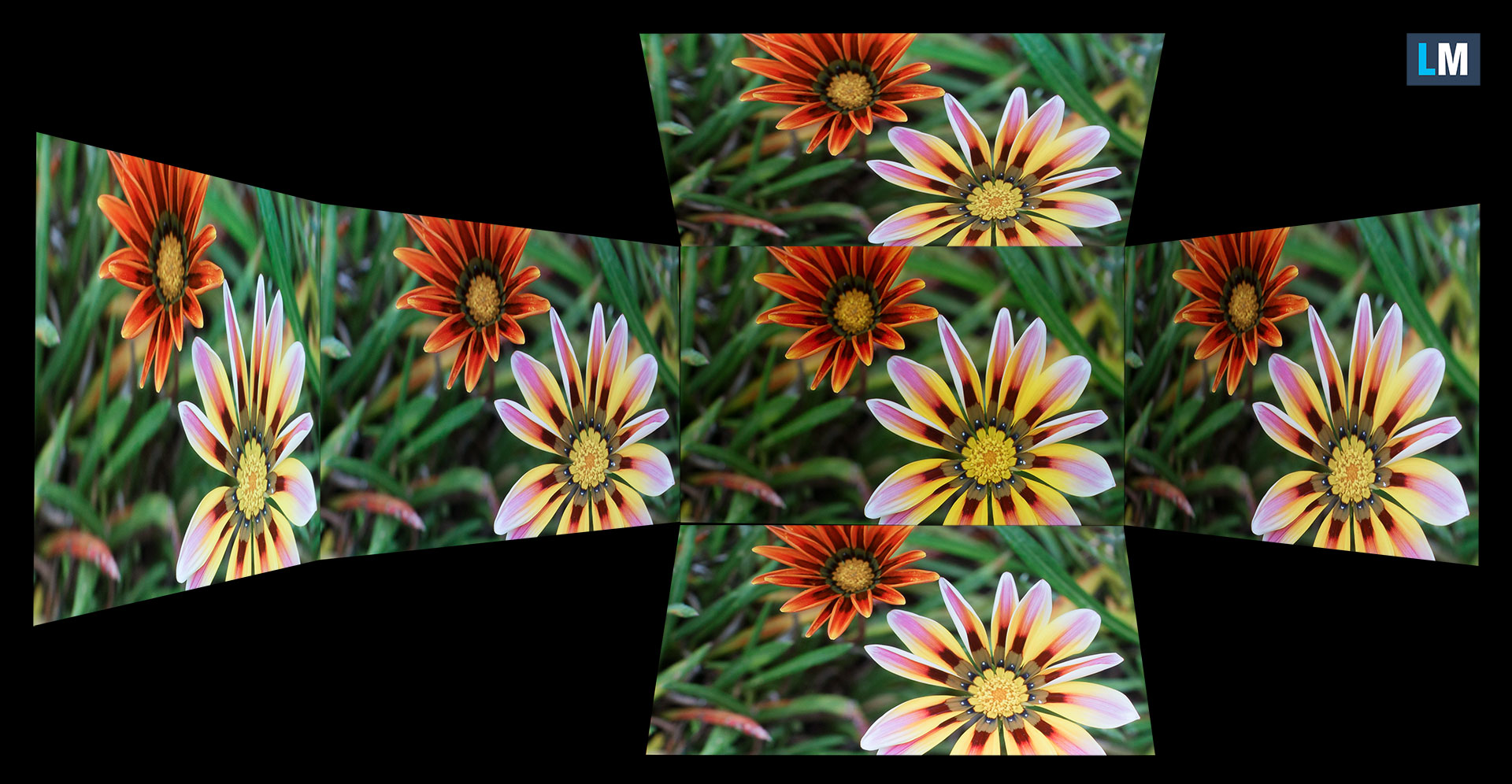
Viewing angles are good. We offer images at different angles to evaluate the quality.
Also, a video with locked focus and exposure.
The maximum measured brightness is 416 nits (cd/m2) in the middle of the screen (HDR off) and 416 nits (cd/m2) average across the surface with a maximum deviation of just 1%. The Correlated Color Temperature on a white screen and at maximum brightness is 6470K („Armoury Grate – Game Visual – Native“ ; „Default“ mode).
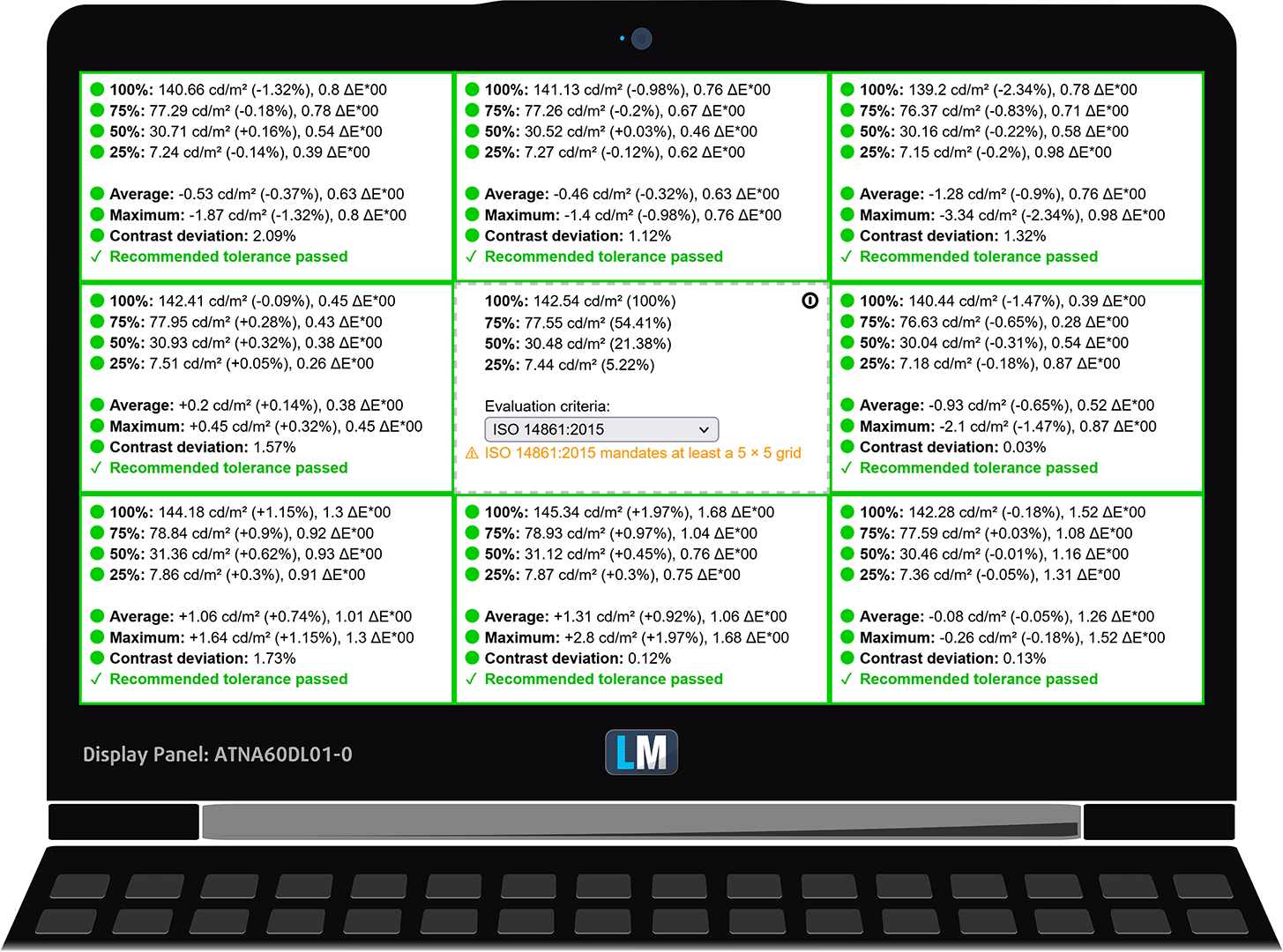
In the illustration below you can see how the display performs from a uniformity perspective. The illustration below shows how matters are for operational brightness levels (approximately 140 nits).
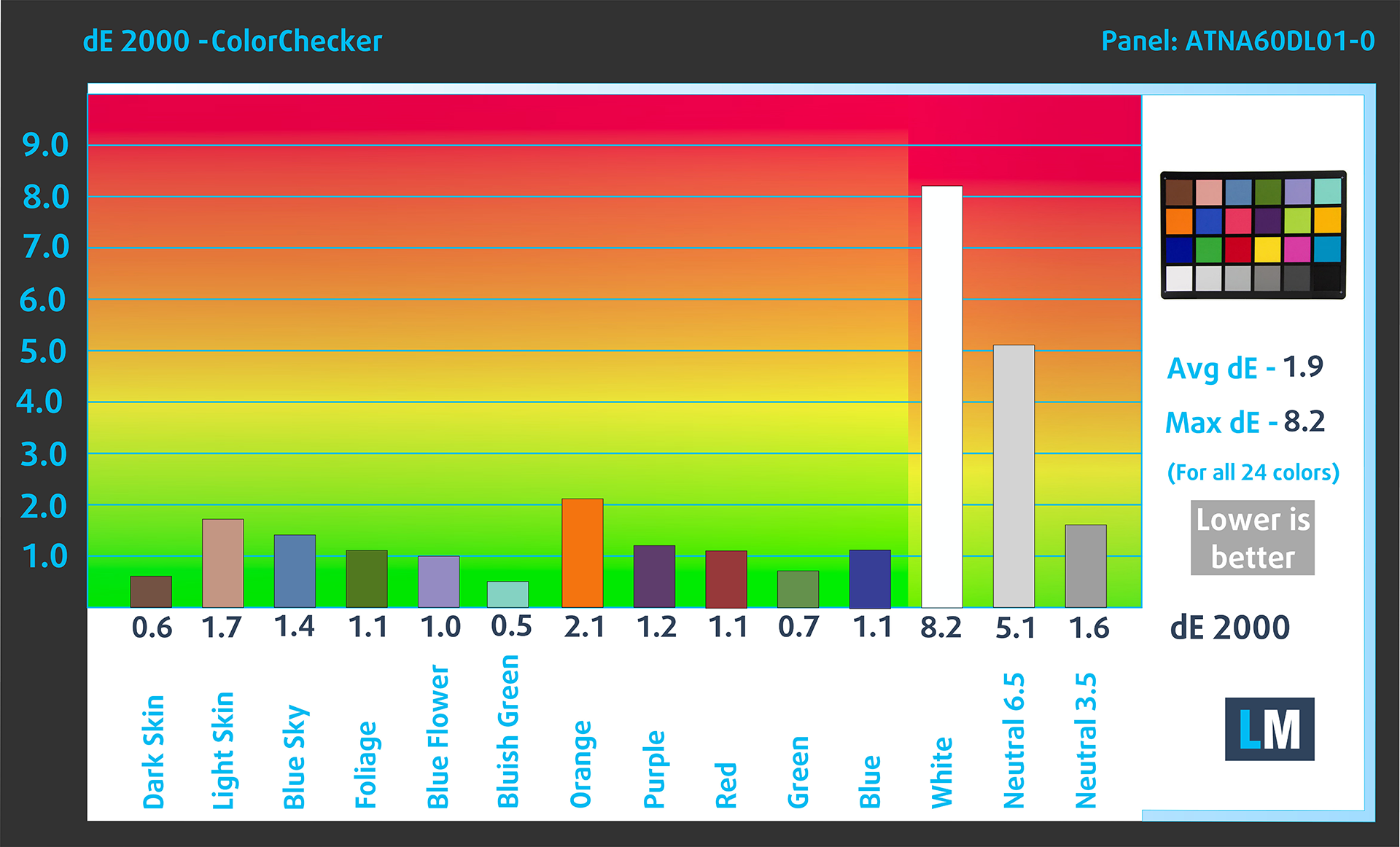
Values of dE2000 over 4.0 should not occur, and this parameter is one of the first you should check if you intend to use the laptop for color-sensitive work (a maximum tolerance of 2.0 ). The contrast ratio of OLED panels is practically infinite, due to their ability to turn off black pixels entirely.
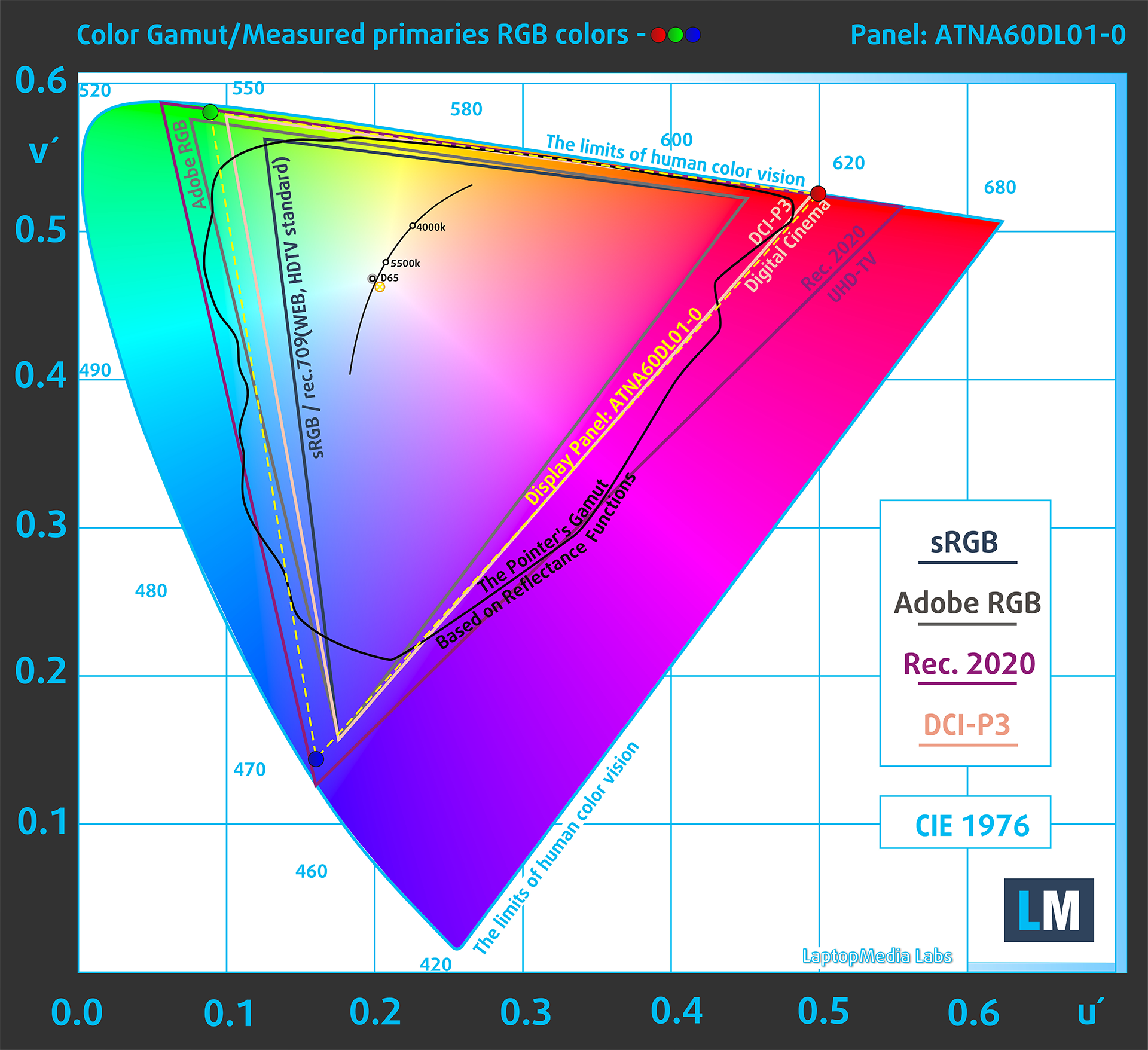
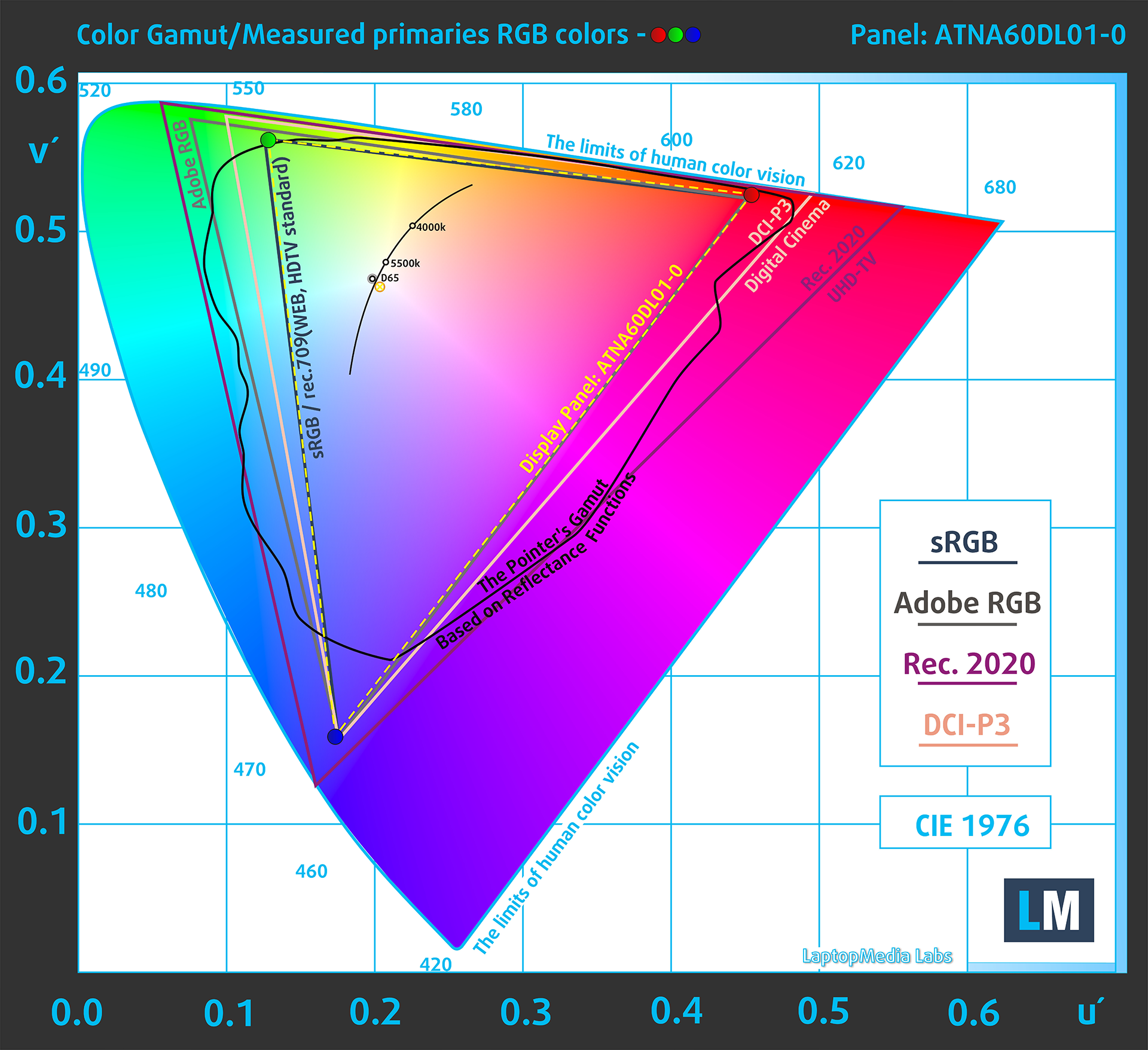
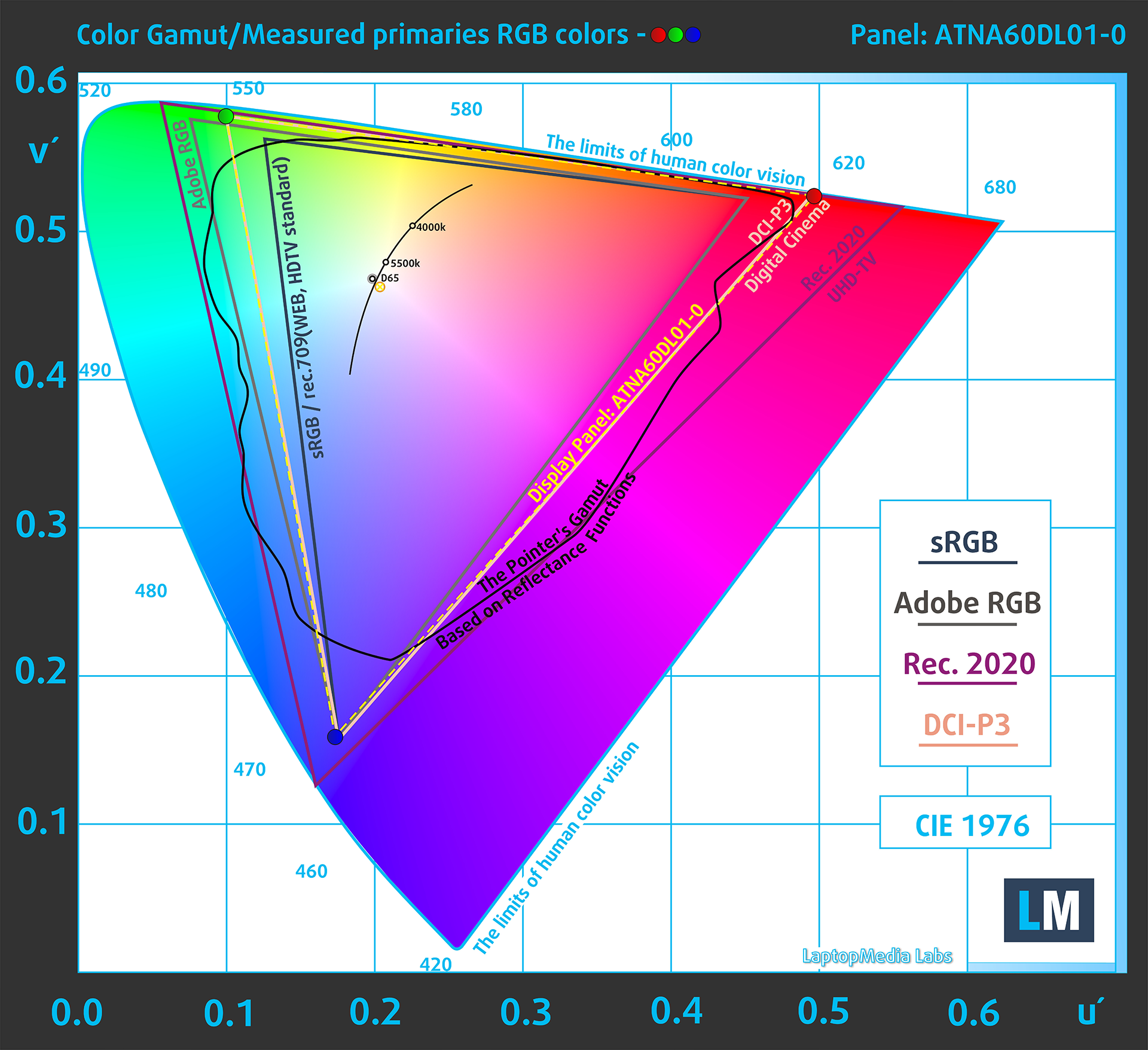
To make sure we are on the same page, we would like to give you a little introduction to the sRGB color gamut and the Adobe RGB. To start, there’s the CIE 1976 Uniform Chromaticity Diagram that represents the visible specter of colors by the human eye, giving you a better perception of the color gamut coverage and the color accuracy.
Inside the black triangle, you will see the standard color gamut (sRGB) that is being used by millions of people on HDTV and on the web. As for the Adobe RGB, this is used in professional cameras, monitors, etc for printing. Basically, colors inside the black triangle are used by everyone and this is the essential part of the color quality and color accuracy of a mainstream notebook.
Still, we’ve included other color spaces like the famous DCI-P3 standard used by movie studios, as well as the digital UHD Rec.2020 standard. Rec.2020, however, is still a thing of the future and it’s difficult for today’s displays to cover that well. We’ve also included the so-called Michael Pointer gamut, or Pointer’s gamut, which represents the colors that naturally occur around us every day.
The yellow dotted line shows ASUS ROG Zephyrus G16 GU605’s color gamut coverage.
Its display covers 100% of the sRGB/ITU-R BT.709 (web/HDTV standard) in CIE1976, and 100% of DCI-P3, ensuring a super vibrant and attractive picture.

The “Armoury Crate” app also emulates the DCI-P3 and the sRGB color spaces.
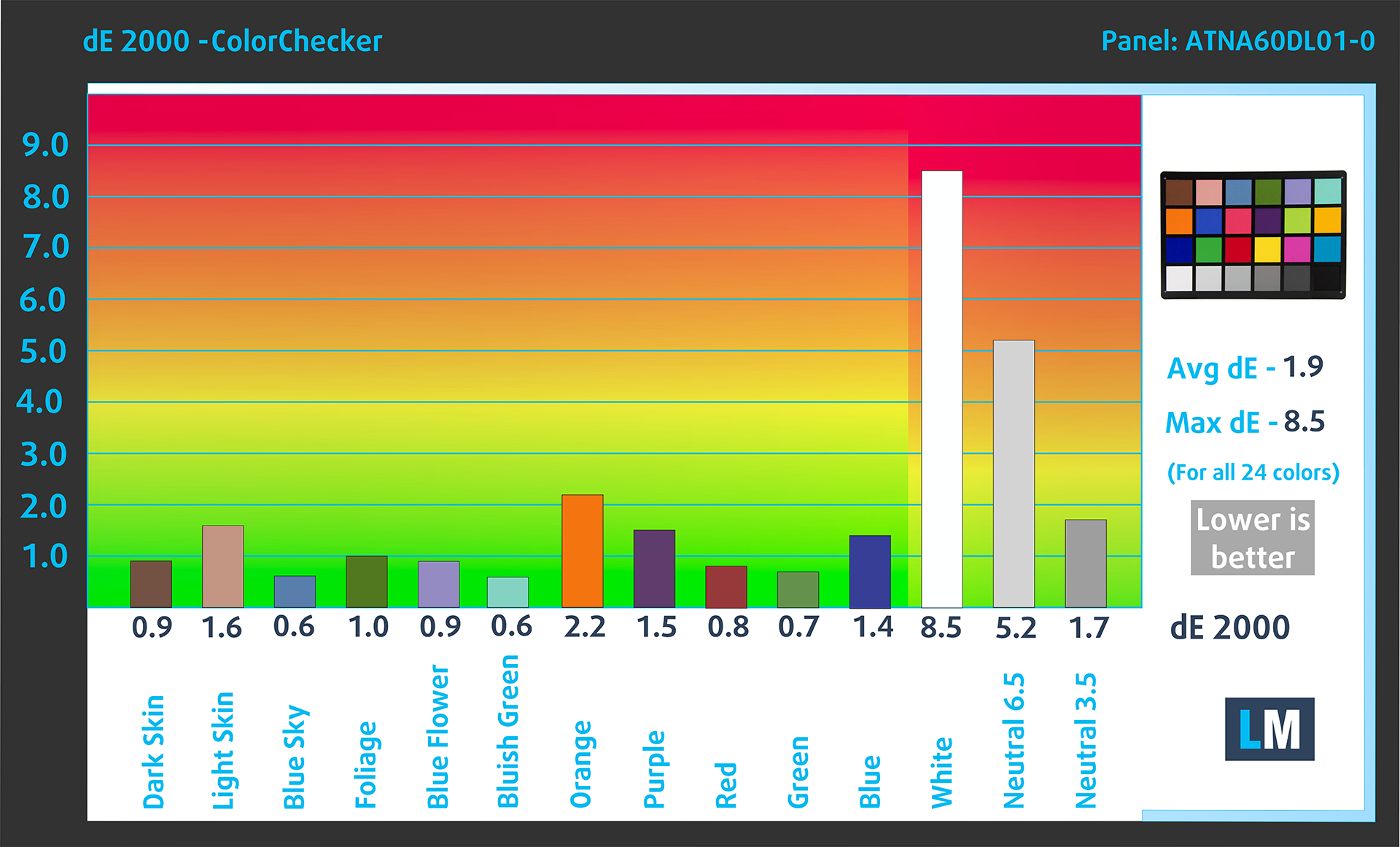
We tested the accuracy of the display with 24 commonly used colors like light and dark human skin, blue sky, green grass, orange, etc.
Below you can compare the scores of the ASUS ROG Zephyrus G16 GU605 with the default settings – HDR off; „Armoury Crate – Color Gamut: Display P3, Default mode“ compared to P3-D65 (Display) color space.
The next graph shows the average dE score when our “Design and Gaming” profile is applied.
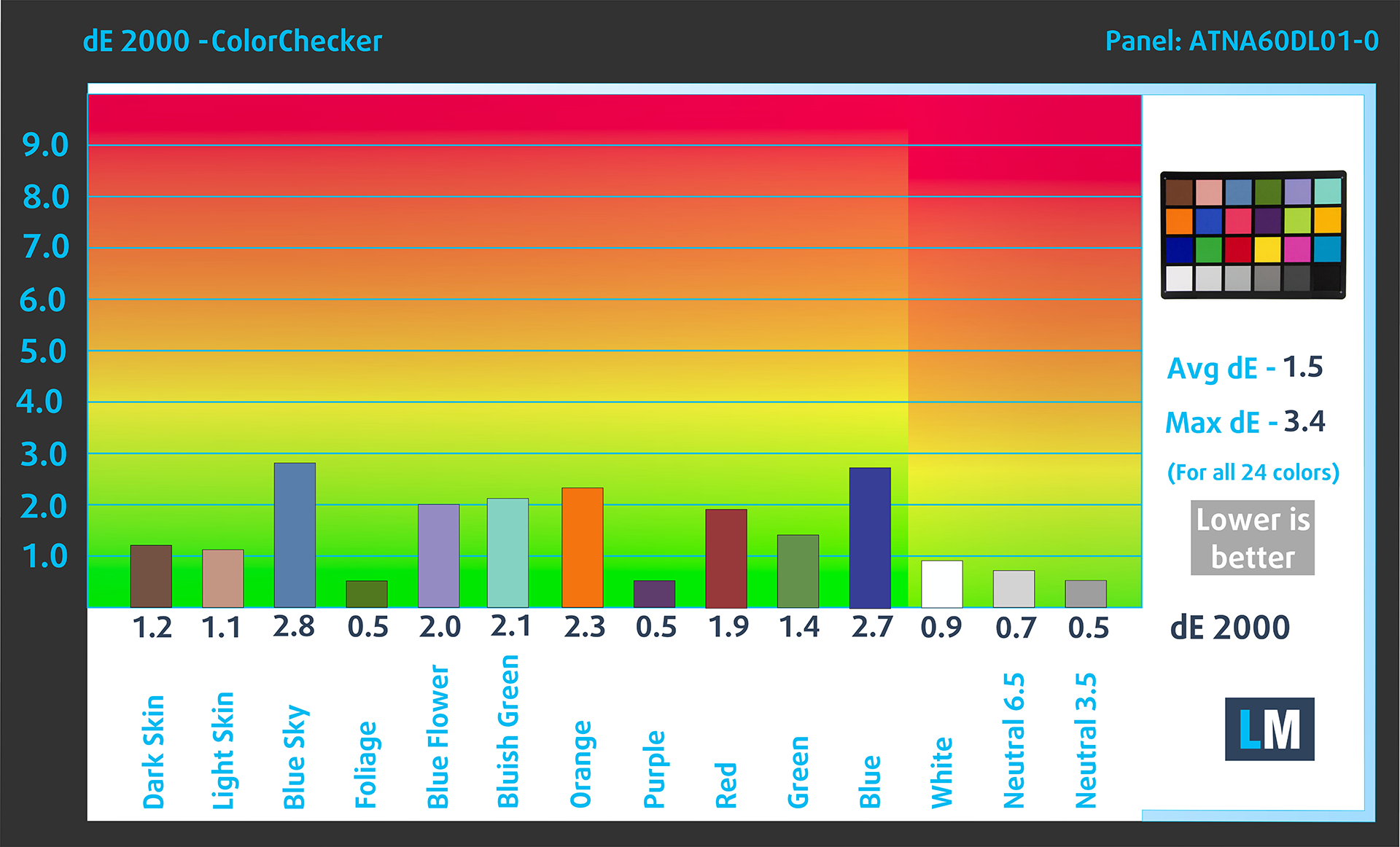
And a comparison with the sRGB color space.
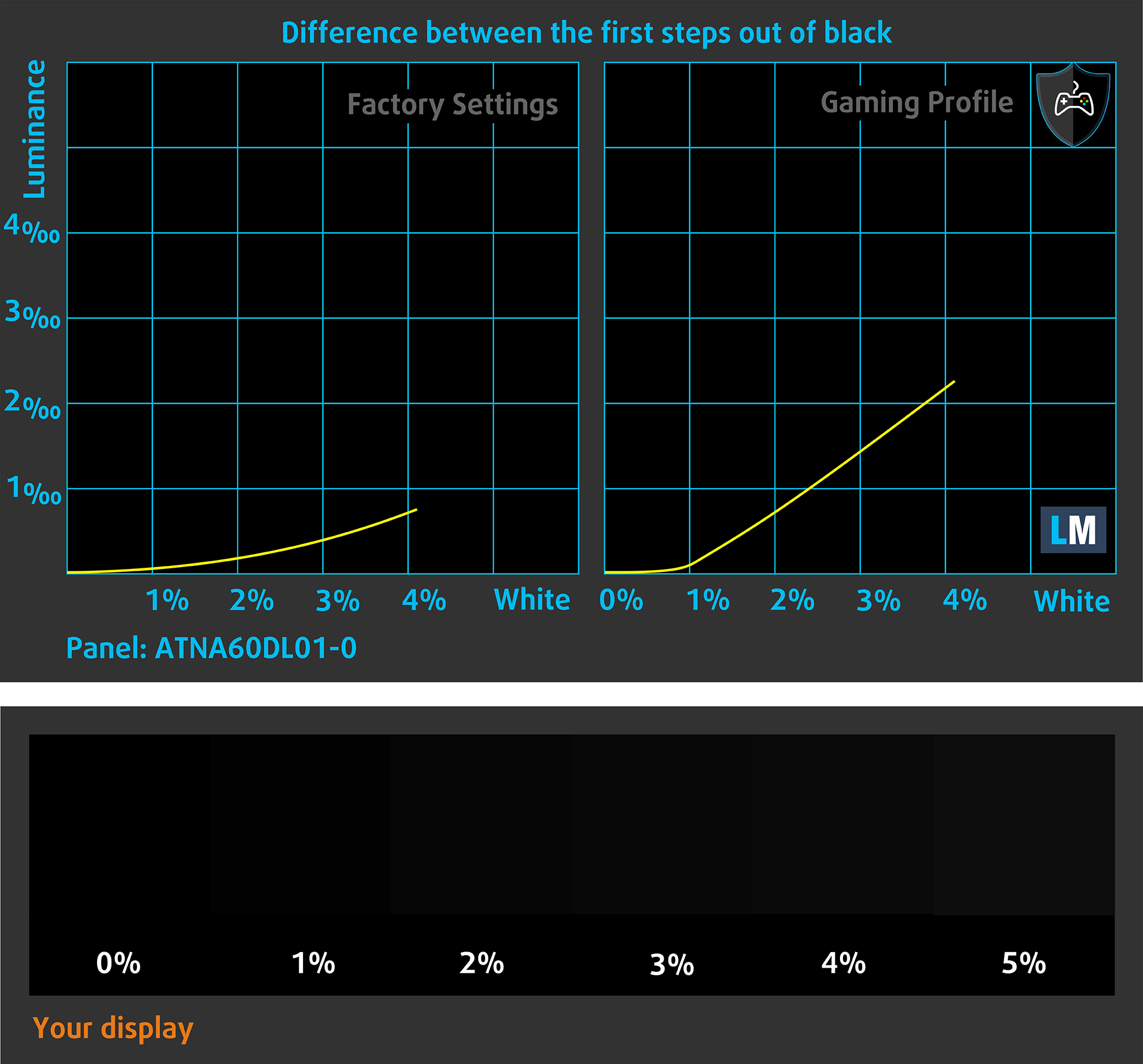
The next figure shows how well the display is able to reproduce really dark parts of an image, which is essential when watching movies or playing games in low ambient light. (HDR Off)
The left side of the image represents the display with stock settings, while the right one is with the “Gaming and Web Design” profile activated. On the horizontal axis, you will find the grayscale, and on the vertical axis – the luminance of the display. On the two graphs below you can easily check for yourself how your display handles the darkest nuances but keep in mind that this also depends on the settings of your current display, the calibration, the viewing angle, and the surrounding light conditions. ASUS’ Armoury Crate app offers many options in this regard. For example, the “FPS” mode has an excellent effect, but it makes to whole picture a bit brighter.
Health Impact: PWM (Screen flickering)
Pulse-width modulation (PWM) is an easy way to control monitor brightness. When you lower the brightness, the light intensity of the display is not lowered, but instead turned off and on by the electronics with a frequency indistinguishable to the human eye. In these light impulses, the light/no-light time ratio varies, while brightness remains unchanged, which is harmful to your eyes. You can read more about that in our dedicated article on PWM.
ASUS ROG Zephyrus G16 GU605’s display pulses but with a limited amplitude for the entire brightness range (with a frequency of 1 kHz). This makes the panel relatively comfortable to use in this aspect.
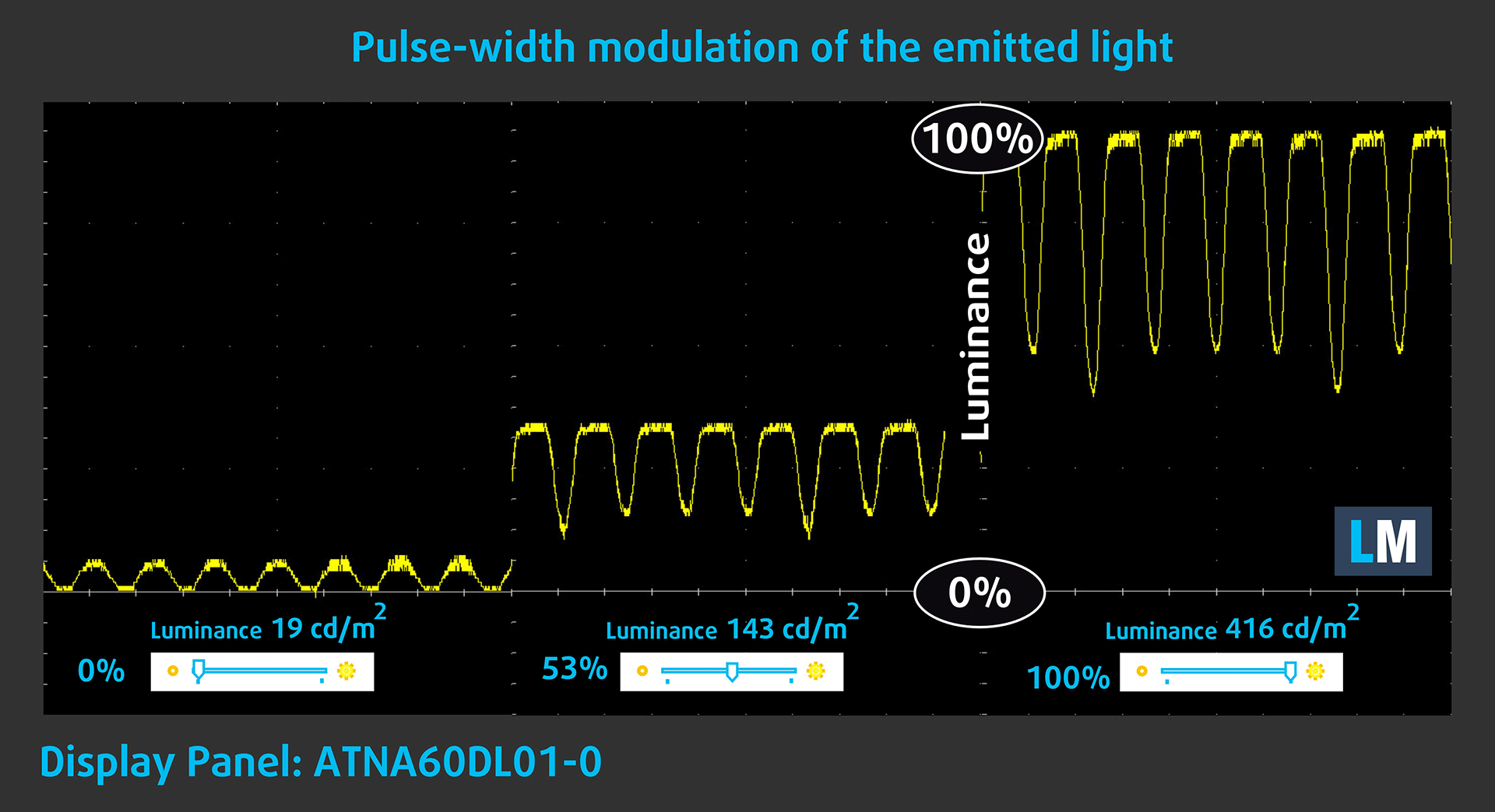
You’ll also find an “OLED Flicker-Free Dimming” slider in the Armory crate app that can be useful if you want to get rid of the pulsations.

Health Impact: Blue light emissions
Installing our Health-Guard profile not only eliminates PWM but also reduces the harmful Blue Light emissions while keeping the colors of the screen perceptually accurate. If you’re not familiar with the Blue light, the TL;DR version is – emissions that negatively affect your eyes, skin, and your whole body. You can find more information about that in our dedicated article on Blue Light.
Health Impact: Gloss-level measurement
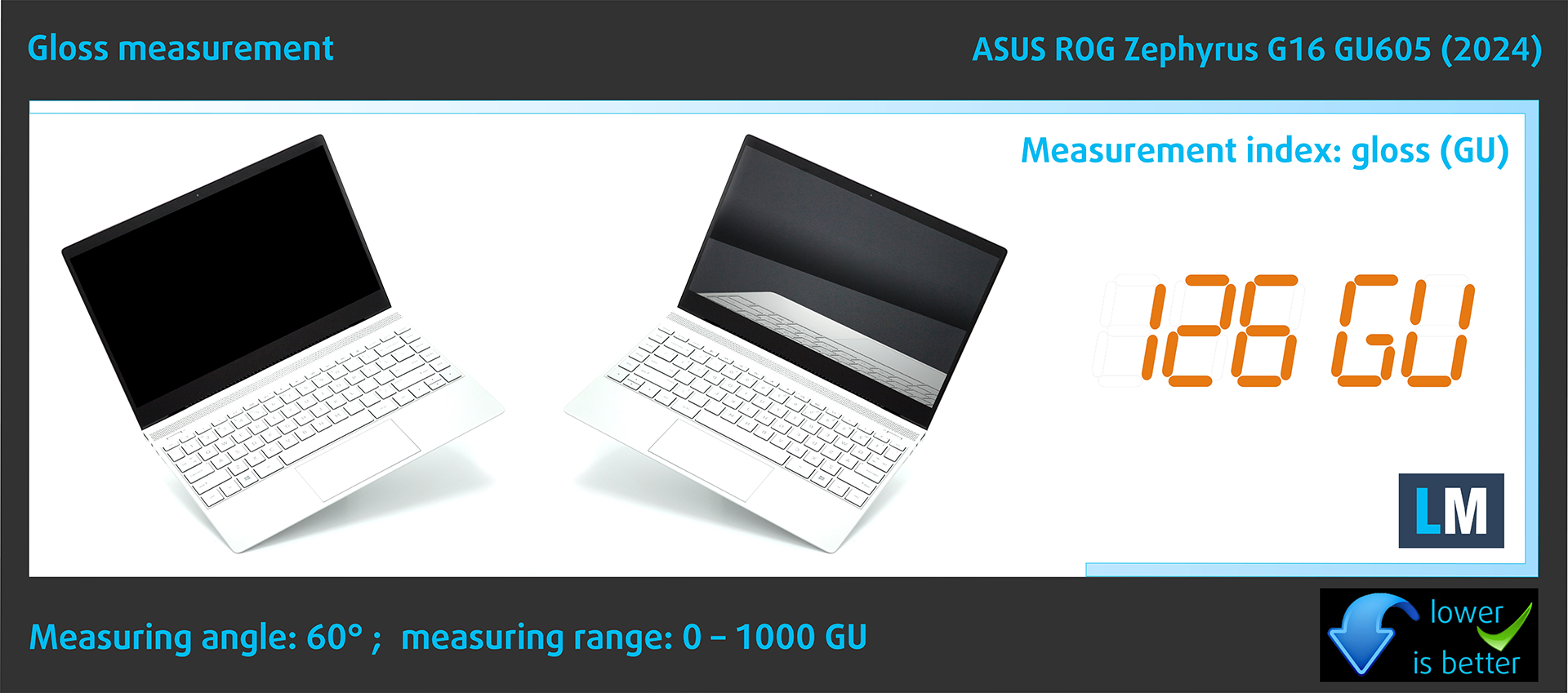
Glossy-coated displays are sometimes inconvenient in high ambient light conditions. We show the level of reflection on the screen for the respective laptop when the display is turned off and the measurement angle is 60° (in this case, the result is 126 GU).
Sound
ASUS ROG Zephyrus G16 GU605’s speakers produce a sound of very good quality. Furthermore, the low, mid, and high tones are clear of deviations.
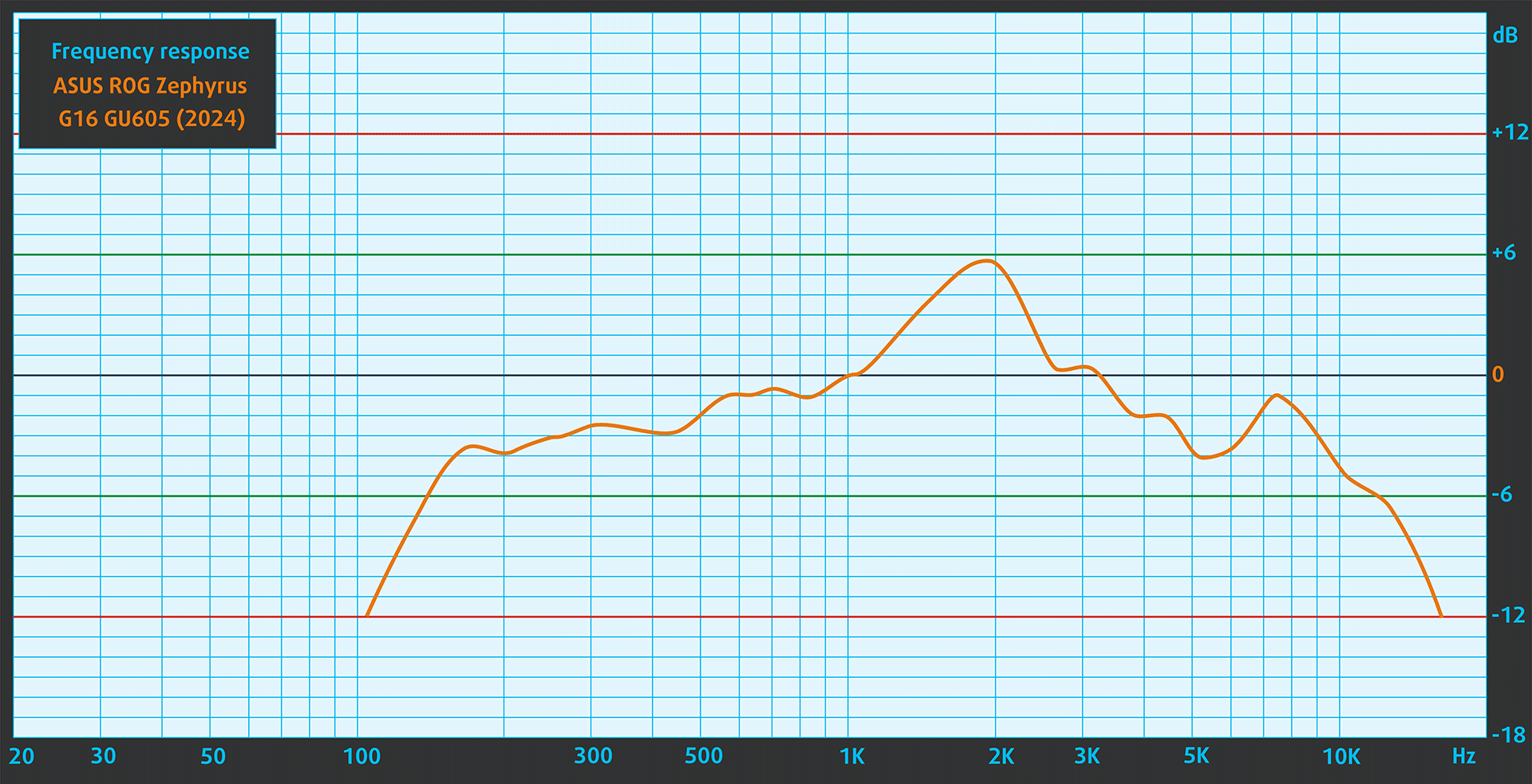
 Author: Nikolay Palaozov
 Author: eng. Kroum NikolovHead of Engineering at LaptopMedia.com, inventor and innovator with 40+ years of experience in electronics and high technology.

![[August 2026] Best-Selling Laptop Brands on Amazon Japan – Apple Dominates Market Share and Revenue Led by Strong Unit Sales](https://laptopmedia.com/wp-content/uploads/2026/09/CO.JP-Best-Brands-1-400x225.jpg)
![[August 2026] Best-Selling Laptop Brands on Amazon USA – Apple Dominates Market Revenue and Volume Despite Lower Model Diversity](https://laptopmedia.com/wp-content/uploads/2026/09/COM-Best-Brands-1-400x225.jpg)
![[August 2026] Amazon Germany: Top 8 Best-Selling Gaming Laptops – Acer Dominates the Market as the Premium Nitro V 17 AI Takes the #1 Spot](https://laptopmedia.com/wp-content/uploads/2026/09/Best-Selling-Gaming-Laptops-DE-Top-10-1-400x225.jpg)
![[August 2026] Best-Selling Laptop Brands on Amazon France – Apple Dominates Revenue Despite Lenovo and HP Leading in Catalog Breadth and Volume](https://laptopmedia.com/wp-content/uploads/2026/09/FR-Best-Brands-1-400x225.jpg)
![[August 2026] Amazon Italy: Top 10 Best-Selling Laptops – Apple MacBook Neo Claims the Crown as Budget and Mid-Range Windows Machines Dominate Volume](https://laptopmedia.com/wp-content/uploads/2026/09/Best-Selling-Laptops-IT-Top-10-400x225.jpg)

OH WOW THE BATTERY IS NOT BAD AT ALL
Definitely impressive to fit a 90Wh battery in such a thin chassis!
Where is the Prime95 test with temperatures/clocks/power?
I’m considering to purchase this ASUS Zephyrus ROG G16 2025, but I’ve never used an OLED laptop before and worrying that I’ll feel uncomfortable using the screen for long periods of time (at least 8h daily). My main doubt is PWM, but I’ve also read that OLED might be bad for working with text. I’m planning to use the laptop for work/home/gaming. Any suggestions for people like me who think about their first OLED? Due to my location and purchase method I’ll not be able to return the item after real life test. Thanks in advance.