Dell G15 5530 review – still a little obese, but has a good cooling
Display quality, Health impact (PWM), Sound
Dell G15 5530 is equipped with a Full HD IPS panel, model number LG M4H3V-156WFG (LGD06E2). It comes with a 165Hz refresh rate. Its diagonal is 15.6″ (39.6 cm), and the resolution – 1920 x 1080p. Additionally, the screen ratio is 16:9, the pixel density – 141 ppi, and their pitch – 0.18 x 0.18 mm. The screen can be considered Retina when viewed from at least 60 cm (from this distance, the average human eye can’t see the individual pixels).

Viewing angles are good. We offer images at different angles to evaluate the quality.

Also, a video with locked focus and exposure.
The maximum measured brightness is 318 nits (cd/m2) in the middle of the screen and 291 nits (cd/m2) average across the surface with a maximum deviation of 12%. The Correlated Color Temperature on a white screen and at maximum brightness is 6760K.
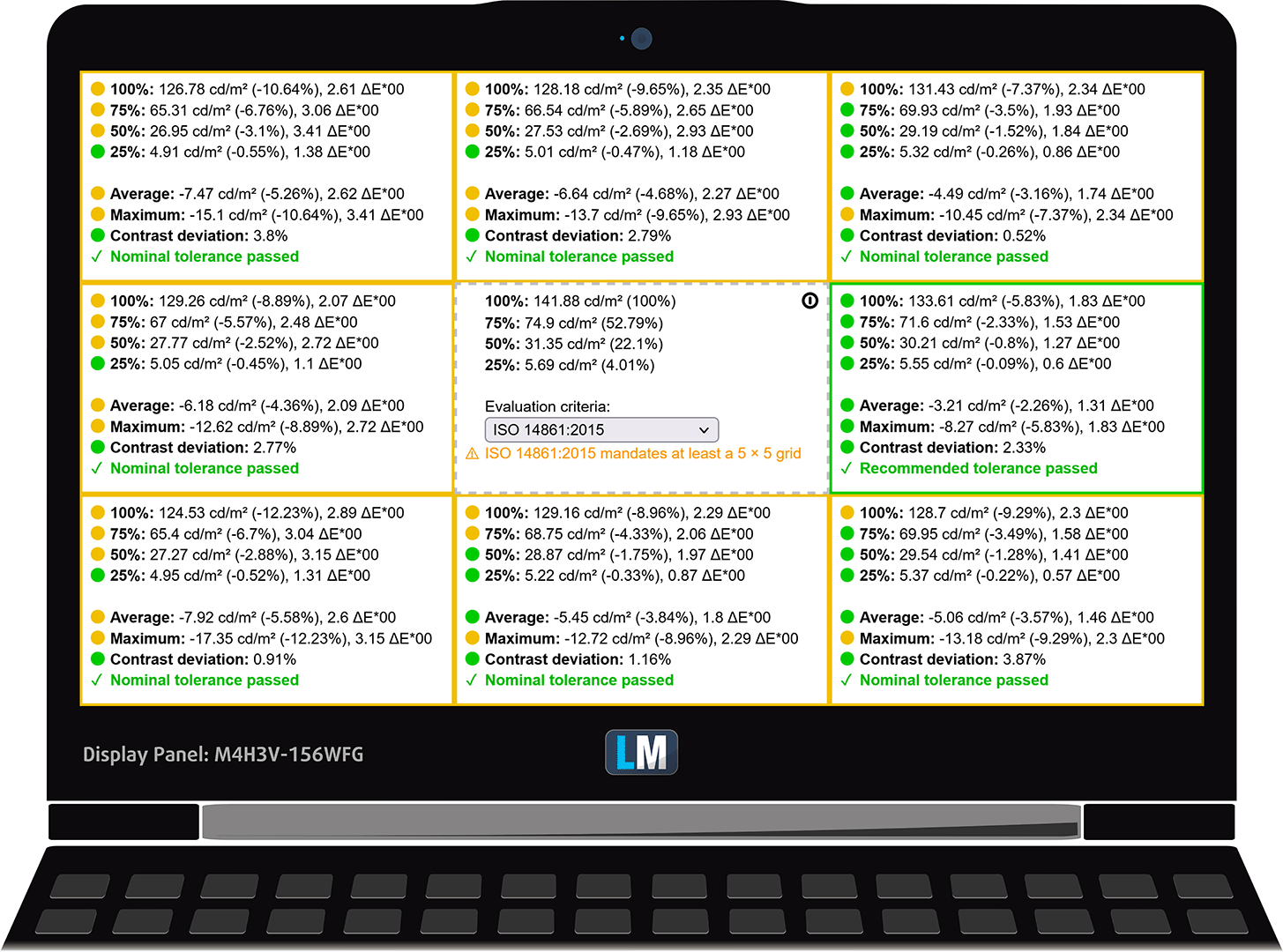
In the illustration below you can see how the display performs from a uniformity perspective. The illustration below shows how matters are for operational brightness levels (approximately 140 nits) – in this particular case at 65% Brightness (White level = 142 cd/m2, Black level = 0.12 cd/m2).
Values of dE2000 over 4.0 should not occur, and this parameter is one of the first you should check if you intend to use the laptop for color-sensitive work (a maximum tolerance of 2.0 ). The contrast ratio is good – 1150:1.
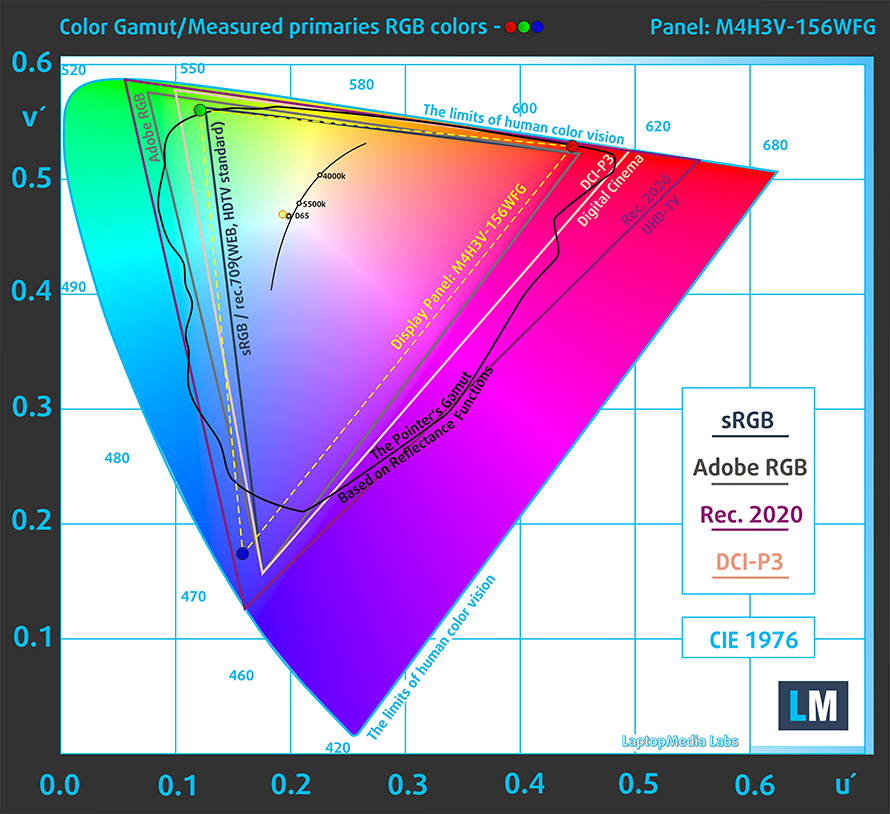
To make sure we are on the same page, we would like to give you a little introduction to the sRGB color gamut and the Adobe RGB. To start, there’s the CIE 1976 Uniform Chromaticity Diagram that represents the visible specter of colors by the human eye, giving you a better perception of the color gamut coverage and the color accuracy.
Inside the black triangle, you will see the standard color gamut (sRGB) that is being used by millions of people on HDTV and on the web. As for the Adobe RGB, this is used in professional cameras, monitors, etc for printing. Basically, colors inside the black triangle are used by everyone and this is the essential part of the color quality and color accuracy of a mainstream notebook.
Still, we’ve included other color spaces like the famous DCI-P3 standard used by movie studios, as well as the digital UHD Rec.2020 standard. Rec.2020, however, is still a thing of the future and it’s difficult for today’s displays to cover that well. We’ve also included the so-called Michael Pointer gamut, or Pointer’s gamut, which represents the colors that naturally occur around us every day.
The yellow dotted line shows Dell G15 5530’s color gamut coverage.
Its display covers 90% of the sRGB/ITU-R BT.709 (web/HDTV standard) in CIE1976 and 75% of DCI-P3.
Our “Design and Gaming” profile delivers optimal color temperature (6500K) at 140 cd/m2 luminance and sRGB gamma mode.
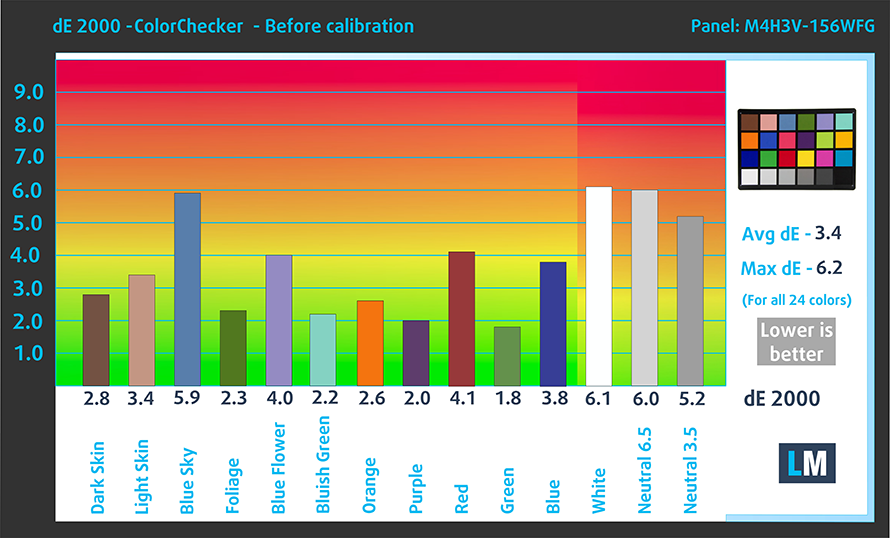
We tested the accuracy of the display with 24 commonly used colors like light and dark human skin, blue sky, green grass, orange, etc. You can check out the results at factory condition and also, with the “Design and Gaming” profile.
Below you can compare the scores of the Dell G15 5530 with the default settings (left), and with the “Gaming and Web design” profile (right).

The next figure shows how well the display is able to reproduce really dark parts of an image, which is essential when watching movies or playing games in low ambient light.
The left side of the image represents the display with stock settings, while the right one is with the “Gaming and Web Design” profile activated. On the horizontal axis, you will find the grayscale, and on the vertical axis – the luminance of the display. On the two graphs below you can easily check for yourself how your display handles the darkest nuances but keep in mind that this also depends on the settings of your current display, the calibration, the viewing angle, and the surrounding light conditions.

Response time (Gaming capabilities)
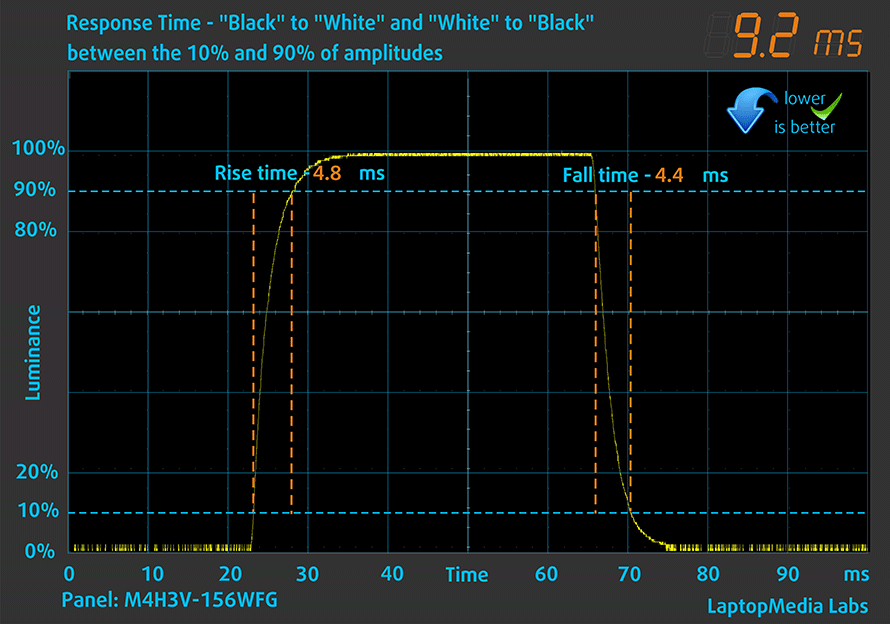
We test the reaction time of the pixels with the usual “black-to-white” and “white-to-black” method from 10% to 90% and vice versa.
We recorded Fall Time + Rise Time = 9 ms.
After that, we test the reaction time of the pixels with the usual “Gray-to-Gray” method from 50% White to 80% White and vice versa between 10% and 90% of the amplitude.
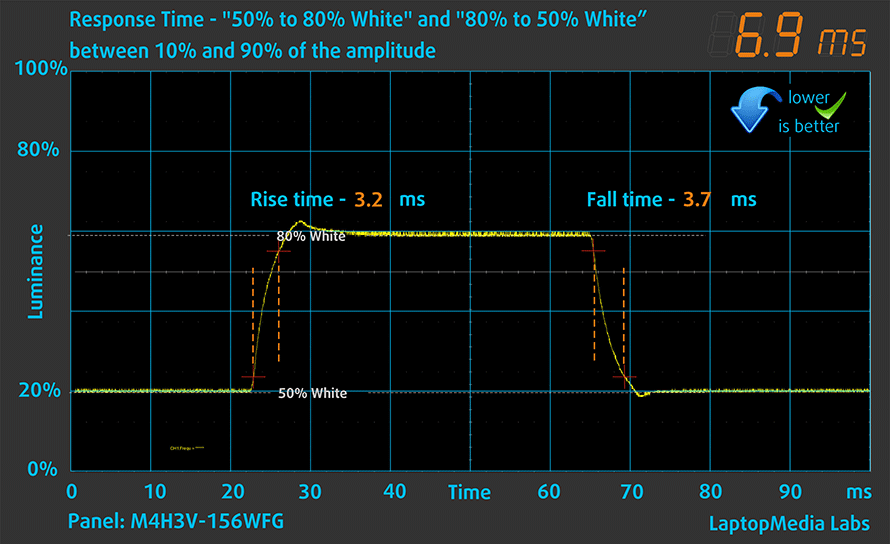
Health Impact: PWM (Screen flickering)
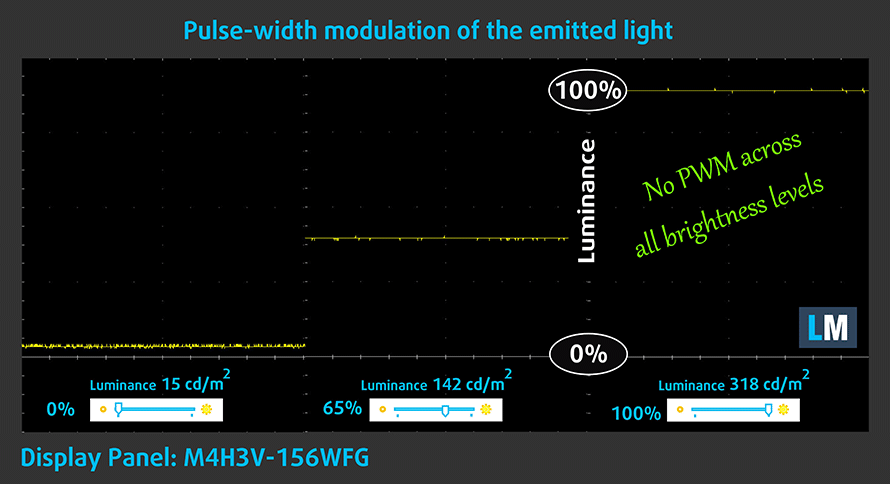
Pulse-width modulation (PWM) is an easy way to control monitor brightness. When you lower the brightness, the light intensity of the backlight is not lowered, but instead turned off and on by the electronics with a frequency indistinguishable to the human eye. In these light impulses, the light/no-light time ratio varies, while brightness remains unchanged, which is harmful to your eyes. You can read more about that in our dedicated article on PWM.
Dell G15 5530’s display doesn’t flicker at any brightness level. This makes the screen pretty comfortable for long periods of use.
Health Impact: Blue light emissions
Installing our Health-Guard profile not only eliminates PWM but also reduces the harmful Blue Light emissions while keeping the colors of the screen perceptually accurate. If you’re not familiar with the Blue light, the TL;DR version is – emissions that negatively affect your eyes, skin, and your whole body. You can find more information about that in our dedicated article on Blue Light.
Health Impact: Gloss-level measurement
Glossy-coated displays are sometimes inconvenient in high ambient light conditions. We show the level of reflection on the screen for the respective laptop when the display is turned off and the measurement angle is 60° (in this case, the result is 26.8 GU).

Sound
Dell G15 5530’s speakers produce a sound of decent quality. Its low, mid, and high tones are clear of deviations.

 Author: Alex Iliev
 Author: eng. Kroum NikolovHead of Engineering at LaptopMedia.com, inventor and innovator with 40+ years of experience in electronics and high technology.

![[August 2026] Amazon Italy: Top 10 Best-Selling Laptops – Apple MacBook Neo Claims the Crown as Budget and Mid-Range Windows Machines Dominate Volume](https://laptopmedia.com/wp-content/uploads/2026/09/Best-Selling-Laptops-IT-Top-10-400x225.jpg)
![[August 2026] Amazon Italy: Top 7 Best-Selling Gaming Laptops – ASUS V16 Claims the #1 Spot Amid Strong Mid-Range Demand](https://laptopmedia.com/wp-content/uploads/2026/09/Best-Selling-Gaming-Laptops-IT-Top-10-400x225.jpg)
![[August 2026] Best-Selling Laptop Brands on Amazon Italy – Lenovo Dominates Market Share and Revenue Leadership](https://laptopmedia.com/wp-content/uploads/2026/09/IT-Best-Brands-400x225.jpg)
![[August 2026] Amazon India: Top 10 Best-Selling Laptops – Apple MacBook Neo Dominates the Charts with Massive Sales Lead](https://laptopmedia.com/wp-content/uploads/2026/09/Best-Selling-Laptops-IN-Top-10-400x225.jpg)
![[August 2026] Amazon India: Top 10 Best-Selling Gaming Laptops – HP Victus 15 Dominates the Market with Massive Unit Lead](https://laptopmedia.com/wp-content/uploads/2026/09/Best-Selling-Gaming-Laptops-IN-Top-10-400x225.jpg)

Hi. Are you sure this one has no PWM ( 0 PWM ); because Notebookcheck mentioned it has 21620 Hz PWM flicker at all times. Can you kindly confirm the same before i purchase. Thanks.
https://www.notebookcheck.net/Dell-G15-5530-Review-A-viable-Alienware-alternative-now-with-Raptor-Lake-HX.726585.0.html
The Display here is a LG, the one in the Notebookcheck review is from AUO. Sadly, we as a consumer have no way to tell Dell which display we want. But the meassured frequency in tthe notebookcheck review is quite high so it should not affect the user.
Oh, ok. Thanks for the confirmation , I think I’ll have to email to DELL directly then
Hello, it seems like that the i9-13900HX model is only available in some countries, so far, the “Dell G15 5530 i9” is available in Tunisia, South Africa, Australia and New Zealand.
Tunisia offers the cheapest option, here’s a link to it. https://www.tunisianet.com.tn/pc-portable-tunisie/68323-pc-portable-dell-gaming-g15-5530-i9-13e-gen-64-go-rtx-4060-8g-windows-11.html
It’s around 2000 USD assuming no sales.
Hola por allá… como ya viste el cargador es masivo y si es pesado, por lo que necesito ayuda para ver si podría haber en el mercado alguno otro cargador compatible de menores proporciones, sin perder tanto capacidad.
Saludos desde México.
I recently bought a 5530 with an RTX 4060. It will not run 3840×2160 HDR 60Hz thru the HDMI 2.1 port. I turned off the Intel UHD GPU in the bios. Despite that, this resolution runs thru the USB-C DP 1.4 port via the Intel GPU. My desktop, 8930 Dell, with the RTX 2060 will also do it. My Sony STR-DH790 AVR, Vizio M658-1 and cables should be fine, not the problem. The last Tech support I received from a supervisor blamed my Vizio. What is wrong with HDMI 2.1?