Dell G15 5530 review – still a little obese, but has a good cooling
Temperatures and comfort, Battery Life
Max CPU load
In this test we use 100% on the CPU cores, monitoring their frequencies and chip temperature. The first column shows a computer’s reaction to a short load (2-10 seconds), the second column simulates a serious task (between 15 and 30 seconds), and the third column is a good indicator of how good the laptop is for long loads such as video rendering.

Average P-core frequency; Average E-core frequency; CPU temp.; Package Power
| Intel Core i5-13450HX (55W TDP) | 0:02 – 0:10 sec | 0:15 – 0:30 sec | 10:00 – 15:00 min |
|---|---|---|---|
| Dell G15 5530 | 4.24 GHz @ 3.26 GHz @ 84°C @ 168W | 4.04 GHz @ 3.17 GHz @ 86°C @ 143W | 3.71 GHz @ 2.34 GHz @ 89°C @ 124W |
Even though this is the lowest-tier CPU that this laptop comes with, the Core i5-13450HX is able to run at really high clocks. Thus, it consumes a lot of power, but as we can see, the cooling system can handle it. In fact, it holds its own especially well in the first minute of the test.
Real-life gaming
| NVIDIA GeForce RTX 4050 | GPU frequency/ Core temp (after 2 min) | GPU frequency/ Core temp (after 30 min) | Max fans |
|---|---|---|---|
| Dell G15 5530 | 2565 MHz @ 65°C @ 89W | 2565 MHz @ 65°C @ 88W | – |
| Dell XPS 15 9530 | 1709 MHz @ 77°C @ 45W | 1828 MHz @ 72°C @ 45W | – |
| Lenovo LOQ (16″ Intel, 2023) | 2685 MHz @ 71°C @ 88W | 2670 MHz @ 79°C @ 90W | – |
| MSI Bravo 15 C7V | 2535 MHz @ 72°C @ 89W | 2535 MHz @ 74°C @ 89W | – |
| ASUS TUF Gaming F15 (FX507, 2023) | 2595 MHz @ 69°C @ 90W | 2595 MHz @ 67°C @ 89W | – |
| MSI Cyborg 15 (A12V) | 1812 MHz @ 64°C @ 45W | 1806 MHz @ 67°C @ 45W | – |
| MSI Katana 15 (B13V) | 2540 MHz @ 74°C @ 85W | 2540 MHz @ 74°C @ 85W | 2550 MHz @ 68°C @ 83W |
While the Dell G15 5530 can’t really take advantage of the full 140W TGP of the RTX 4050, it actually runs it at pretty adequate clocks, comparing it to its competitors. Moreover, the system was the quietest and the coolest among the devices we tested with this GPU.
Gaming comfort
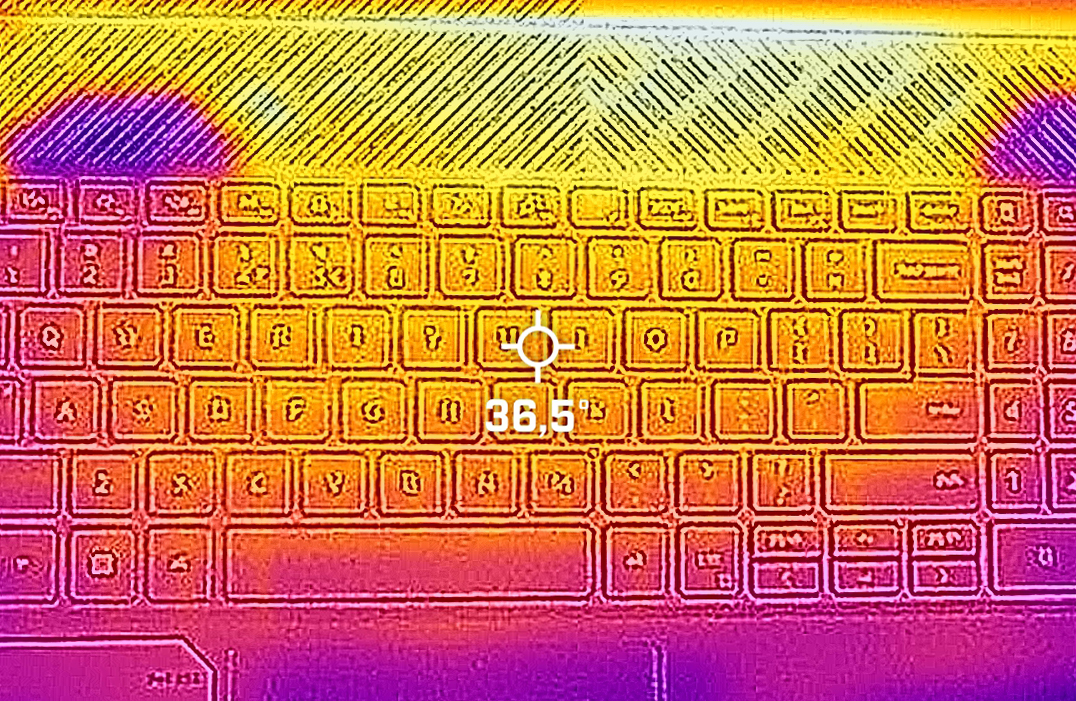
As you can see from the IR image below, Dell made the smart choice to move the heating components upwards. This is the reason your keyboard will remain relatively cool.
Battery
Now, we conduct the battery tests with the Windows Better performance setting turned on, screen brightness adjusted to 120 nits and all other programs turned off except for the one we are testing the notebook with. This device comes with an 86Wh battery pack. It lasts for 6 hours and 25 minutes of Web browsing, or 6 hours and 57 minutes of video playback.
Brightness: 180 nits; Display Mode: SDR
Time to Full Discharge: Higher is Better
In order to simulate real-life conditions, we used our own script for automatic web browsing through over 70 websites.
 Author: Alex Iliev
 Author: eng. Kroum NikolovHead of Engineering at LaptopMedia.com, inventor and innovator with 40+ years of experience in electronics and high technology.

![[August 2026] Amazon Italy: Top 10 Best-Selling Laptops – Apple MacBook Neo Claims the Crown as Budget and Mid-Range Windows Machines Dominate Volume](https://laptopmedia.com/wp-content/uploads/2026/09/Best-Selling-Laptops-IT-Top-10-400x225.jpg)
![[August 2026] Amazon Italy: Top 7 Best-Selling Gaming Laptops – ASUS V16 Claims the #1 Spot Amid Strong Mid-Range Demand](https://laptopmedia.com/wp-content/uploads/2026/09/Best-Selling-Gaming-Laptops-IT-Top-10-400x225.jpg)
![[August 2026] Best-Selling Laptop Brands on Amazon Italy – Lenovo Dominates Market Share and Revenue Leadership](https://laptopmedia.com/wp-content/uploads/2026/09/IT-Best-Brands-400x225.jpg)
![[August 2026] Amazon India: Top 10 Best-Selling Laptops – Apple MacBook Neo Dominates the Charts with Massive Sales Lead](https://laptopmedia.com/wp-content/uploads/2026/09/Best-Selling-Laptops-IN-Top-10-400x225.jpg)
![[August 2026] Amazon India: Top 10 Best-Selling Gaming Laptops – HP Victus 15 Dominates the Market with Massive Unit Lead](https://laptopmedia.com/wp-content/uploads/2026/09/Best-Selling-Gaming-Laptops-IN-Top-10-400x225.jpg)

Hi. Are you sure this one has no PWM ( 0 PWM ); because Notebookcheck mentioned it has 21620 Hz PWM flicker at all times. Can you kindly confirm the same before i purchase. Thanks.
https://www.notebookcheck.net/Dell-G15-5530-Review-A-viable-Alienware-alternative-now-with-Raptor-Lake-HX.726585.0.html
The Display here is a LG, the one in the Notebookcheck review is from AUO. Sadly, we as a consumer have no way to tell Dell which display we want. But the meassured frequency in tthe notebookcheck review is quite high so it should not affect the user.
Oh, ok. Thanks for the confirmation , I think I’ll have to email to DELL directly then
Hello, it seems like that the i9-13900HX model is only available in some countries, so far, the “Dell G15 5530 i9” is available in Tunisia, South Africa, Australia and New Zealand.
Tunisia offers the cheapest option, here’s a link to it. https://www.tunisianet.com.tn/pc-portable-tunisie/68323-pc-portable-dell-gaming-g15-5530-i9-13e-gen-64-go-rtx-4060-8g-windows-11.html
It’s around 2000 USD assuming no sales.
Hola por allá… como ya viste el cargador es masivo y si es pesado, por lo que necesito ayuda para ver si podría haber en el mercado alguno otro cargador compatible de menores proporciones, sin perder tanto capacidad.
Saludos desde México.
I recently bought a 5530 with an RTX 4060. It will not run 3840×2160 HDR 60Hz thru the HDMI 2.1 port. I turned off the Intel UHD GPU in the bios. Despite that, this resolution runs thru the USB-C DP 1.4 port via the Intel GPU. My desktop, 8930 Dell, with the RTX 2060 will also do it. My Sony STR-DH790 AVR, Vizio M658-1 and cables should be fine, not the problem. The last Tech support I received from a supervisor blamed my Vizio. What is wrong with HDMI 2.1?